One Suspicious Sign-in, 97 Backends: Mapping BlackApex, the Device Code Phishing Kit That Leaks Its Own Config
An account takeover signal led me to BlackApex, a device code phishing kit that registers its own device and leaks its own config. 97 backends mapped.
The views and opinions expressed in this post are my own and do not represent those of my employer. This is a personal blog where I share research and things I’m learning.
TL;DR
I was investigating an account takeover signal on a Microsoft 365 user. The sign-in IP,
108.186.112[.]17, turned out to be a backend for a phishing kit that calls itself BlackApex. It hides behind a fake “Just a moment… | OneDrive” Cloudflare check and takes the victim through a real Microsoft sign-in. Depending on how the operator set it up, it then registers its own device and can add a Windows Hello for Business key within seconds. MFA does not stop it and a password reset does not remove it. Most of its nodes answerGET /api/settingswithout authentication. Asking the cluster’s 570 domains and 182 candidate origin servers gave me 97 distinct backend addresses, collected independently. Other researchers have published on this kit too, and I reference their work below.What to do first in your tenant:
- Block device code flow with a Conditional Access authentication flows policy (report-only first, then on)
- Hunt Entra audit logs for
Register devicefollowed within a minute by a Windows Hello for Business credential being added for the same user- When you remediate a phished account, delete the devices and Windows Hello keys the attacker registered. Resetting the password is the last step, not the fix
- Hunt proxy logs for
/state?device_code=,/api/landing-paths/activeand/verify-turnstileFull IOCs and hunt queries are at the bottom.
It started with one IP address
I was working an account takeover signal: a detection for a possible account compromise on a Microsoft 365 user. The sign-in had come in through device code flow, and by the time anyone looked, the attacker had registered a device of their own against the account. The credentials were rotated. The attacker’s device was still there afterwards, and so was their access.
That last part is the reason this post exists. Most of us still treat “reset the password and revoke sessions” as the end of a phishing incident. Against this kit it is not even the middle.
I’m keeping the incident itself out of this post. What I can share is where the sign-in IP led: 108.186.112[.]17. I expected a VPS that somebody had rented for a week. What I found was one node of a phishing platform with its own brand name, an operator console, a template library, and a habit of handing its configuration to anyone who asks.
This one is long. It covers how I got from one IP to the whole platform, what the operator console does, and what I would change in a tenant because of it. If you look after a Microsoft 365 tenant, your users are being sent these links too.
What has already been published
This kit is not a new discovery and I want to be clear about that up front. SpiderLabs researchers Serhii Melnyk, Cris Tomboc and King Orande published BlackApex, SPY, and Counting on 2026-10-30. They worked from the lure emails, the page source and the inside of the admin panel. They describe the device code flow in detail, show the panel holding captured PRTs that are used to reach victim mailboxes, and make a good case that the code was largely written with AI assistance. They also pivoted to more than 70 panels, noted that the panel settings expose VPS addresses, and reported API paths that need no authentication. If you want the front end of this kit, read theirs.
I found their write-up after I had already built the map in this post, so the two were done independently. Mine starts at a sign-in IP from a real account takeover and works outward. What I think this post adds is the Windows Hello persistence step, a page-by-page walk through the operator console, and a larger count of the infrastructure as it stood on 2026-11-26.
Defender quick reference
| Field | Details |
|---|---|
| Activity type | Phishing kit targeting Microsoft 365 / Entra ID, apparently deployed by many operators. Device code phishing with device registration persistence |
| Primary artifacts | Page title Just a moment... | OneDrive, GET /api/landing-paths/active, POST /verify-turnstile, GET /state?device_code=, lure parameters check_type=password&shareable=true&access=restricted, 108.186.112[.]17 |
| Verdict | Malicious |
| Confidence | High for the infrastructure (the kit identifies itself) and for the lure page, which I recorded on two domains. I did not complete a sign-in, so what happens after one rests on the incident, the kit’s configuration and the operator console |
| Key logs | Entra sign-in logs (authentication protocol), Entra audit logs (device registration, authentication methods), proxy, DNS |
| ATT&CK | T1566.002, T1528, T1098.005, T1550.001, T1114.002 |
| First defender actions | Revoke sessions, delete attacker-registered devices and Windows Hello keys, review authentication methods, then reset the password |
| Detection opportunities | Device code sign-ins, device registration followed by a Windows Hello key, kit URL paths in proxy logs |
| False-positive notes | Device code flow is legitimate for meeting room devices and some CLI tools. Baseline your own use before you alert on it |
The attack at a glance
- Lure - per the SpiderLabs analysis, an email leads through a trusted service to a kit domain. The gate page is written to read the target’s address from
?acct=or?email=. Template names in the kit’s configuration includeonedrive,docusign,calendly,voicemailandmicrosoft. - Gate - a fake Cloudflare “Just a moment…” page with a real Cloudflare Turnstile widget, there to keep scanners and sandboxes out.
- Sign-in - the lure page shows a code and opens Microsoft’s real device login page. The victim completes a genuine Microsoft sign-in, MFA included. The kit ends up holding tokens for the account.
- Persistence - depending on the operator’s settings, the kit registers a device in the victim’s tenant, obtains a Primary Refresh Token for it, and can add a Windows Hello for Business key. On the one panel I saw, that took seconds.
- Operations - the operator works from a console: read and send mail, pull contacts, list the directory, and try to escalate.
The OSINT trail
From an IP to a page title
An IP address on its own tells you very little. Team Cymru’s whois puts 108.186.112[.]17 in AS399486, registered to a Canadian company. That fits a rented VPS and not much else.
The useful step was looking at what the IP had been serving. Validin records the HTML titles it sees on hosts, and this IP had been returning a page titled Just a moment... | OneDrive. It was first seen doing so on 2026-11-08 and last seen on 2026-11-24.
That title stood out straight away. The Cloudflare “verify you are human” page I am used to seeing is titled “Just a moment…” on its own. OneDrive does not sit behind a third-party browser check. A page with both in the title is pretending to be two things at once, so I searched Validin for other hosts that had returned it.
The export came back with 2,795 rows: 1,578 hostnames and 1,217 IP addresses, seen between 2026-04-27 and 2026-11-25. 898 of those IPs belong to Cloudflare (AS13335), so most of what Validin saw was Cloudflare’s edge and not the real servers. The IP from the alert had 15 observations, against 1,374 for the busiest address. It was not the centre of anything. It was one leaf.
The gate page
I picked a live hostname from the export, vc-docs[.]sbs, and fetched the page. It is 6.3 KB of plain HTML and inline JavaScript with one job: decide whether you are a person before showing you anything worth capturing.
1
2
3
4
5
6
7
8
9
10
11
12
// from the gate page at vc-docs[.]sbs, trimmed
function generateRayId(){var r='';for(i=0;i<16;i++)r+='abcdef0123456789'[Math.floor(Math.random()*16)];return r;}
acct=urlParams.get('acct')||urlParams.get('email');
if(acct)eParameter=btoa(acct).replace(/=/g,'');
const r=await fetch('/api/landing-paths/active');
...
const r=await fetch('/verify-turnstile',{method:'POST', ... });
...
u+='auth=1&shareable=true&access=restricted&check_type=password×tamp='+...
+'&e='+encodeURIComponent(eParameter)+'&dc='+encodeURIComponent(deskCode)+...
Three things in there are worth knowing.
The Turnstile widget is real. It loads from challenges.cloudflare[.]com with the operator’s own site key, so the kit gets Cloudflare’s bot detection for free. The “Ray ID” under it is not real. It is sixteen random hex characters generated in the browser, there to make the page look like the Cloudflare check everyone has clicked through a hundred times.
The victim’s email address rides in on the URL, gets base64 encoded, and is carried through the redirect. That is how the operator knows who clicked.
Before it redirects anywhere, the page asks its own server which lure path is active by calling /api/landing-paths/active. That is a custom API on a phishing page, and custom APIs are worth poking at.
The gate seems to work. urlscan had 281 results for this title. Because I searched by the gate title, that mostly tells me how often a scan ended on the gate. In the three full results I pulled, the request log stops at the Turnstile challenge. During the mapping I did not get further either. The next day I went back in a browser, completed the check, and recorded the page behind it. That is in the sign-in section below.
The API that answers too many questions
/api/landing-paths/active returned JSON without asking who I was. So I tried the obvious neighbours, using GET requests with no body.
Almost everything I guessed, including /api/sessions, /api/victims and /api/captures, returned the same 403 as /favicon.ico. So I can’t tell which of those routes exist, and I did not push further. Four routes did answer: /api/health, /api/landing-paths, /api/landing-paths/active and /api/settings. A fifth, /api/templates, was not in that first list of guesses. It answered on 64 nodes, this one included.
/api/settings is the one that changes the investigation. This is what the node behind vc-docs[.]sbs returned, trimmed and with the secrets removed by me:
1
2
3
4
5
6
7
8
9
10
11
12
13
14
15
16
17
{
  "active_resource": "graph",
  "active_template": "microsoft",
  "api_version": "2",
  "auto_action": "none",
  "cae": "false",
  "domain": "vc-docs[.]sbs",
  "edge_gateway_api_key": "[REDACTED]",
  "landing_path_mode": "static",
  "ngcmfa": "false",
  "redirect_url": "hxxps://vc-docs[.]sbs",
  "turnstile_mode": "non-interactive",
  "turnstile_secret_key": "[REDACTED]",
  "turnstile_site_key": "0x4AAAAAAFqOWVQ4to01Wh0J",
  "turnstile_theme": "light",
  "vps_ip": "108.165.15[.]92"
}
The kit puts its servers behind Cloudflare to hide them, then publishes vps_ip, the address of the real server, on an open endpoint. It also returns a Turnstile secret and an API key. I am not publishing either.
/api/health is quieter but tells you what the backend is doing. Trimmed:
1
2
3
4
5
6
7
8
{
  "active_sessions": "[REMOVED]",
  "background_extraction_running": true,
  "crypto_available": true,
  "poller_running": true,
  "status": "healthy",
  "token_refresher_running": true
}
A poller, a token refresher and a background extraction job. Hold on to poller_running. It comes back when we get to how the sign-in works.
One small detail I enjoyed. The landing path records on this node carry a creation timestamp of 2026-10-28 23:12 UTC. RDAP says vc-docs[.]sbs was registered on 2026-10-28. It looks like the operator bought the domain and stood the kit up the same day.
Going around Cloudflare
Now there was a repeatable method. Ask each domain in the Validin export for /api/settings, collect the vps_ip values, and you have the real servers.
Shodan filled in the rest. Searching for the kit’s page content (landing-paths, and the anti-bot.js plus verify-turnstile pair) found origin servers that Validin had not seen, plus 92 more hostnames that I did not probe. I did not keep the exact query strings, so treat that part as less repeatable than the rest. It also showed something the operators presumably did not intend: the application itself listening on TCP 5000, reachable directly, with no Cloudflare in front of it.
On port 5000 the app answers as waitress, a Python WSGI server, and /admin returns a login form. Its title is how I learned what this thing is called:
1
2
3
<html lang="en" data-admin-theme="jordan">
<head>
    <title>Admin Login - BlackApex</title>
That name matches the earlier SpiderLabs write-up, which is how I know we were looking at the same thing.
The theme is named jordan and the page hotlinks a basketball photo from a pop-culture wiki as its background. Four more colour themes sit behind a picker in the corner. Someone spent real time on the login screen of a phishing panel and skipped authentication on /api/settings.
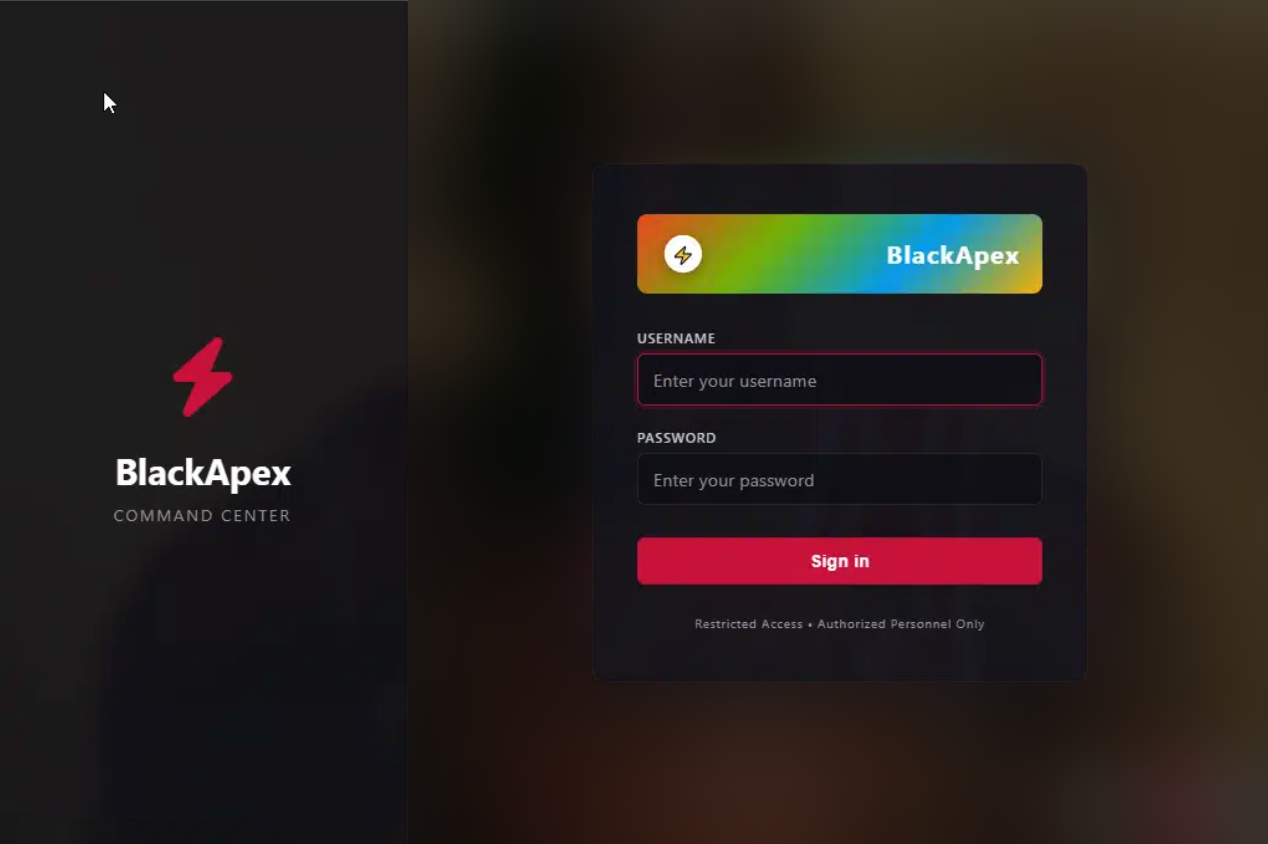 The operator login. Background blurred by me. The coloured dots are theme pickers.
Some login pages did not say BlackApex. In the earlier sweep, 13 servers had the title XXX101-TOKEN, two said FASA and one said ALIBOBO-TOKEN. They answered /api/health like the BlackApex nodes. In the first sweep none of the 16 returned /api/settings. In the second run 13 of them did, with fewer fields than the BlackApex-titled servers. The two FASA servers and one XXX101-TOKEN server answered as nginx on 443. The SpiderLabs write-up lists more names I did not see, including DarkApex, SPY and W1-TOKEN, and counted more than 70 instances a month ago. They report that the instances share the same backend and admin panel. My read is that this is one product being resold or rebranded. From my side I can only see the renamed title and the same API answering.
What the map looks like
I ran the sweep twice on 2026-11-26 to see what held still. These are the figures from the second run.
| What | Count | Basis |
|---|---|---|
| Hostnames that served the gate title | 1,578 | Validin export |
| Registered domains | 570 | Validin export. Shodan added 92 more hostnames that I did not probe |
| Domains still resolving | 302 of 570 | One DNS lookup each on 2026-11-26, so a floor |
| Domains serving the kit API | 66 | /api/landing-paths/active returned the kit’s JSON |
| Backend addresses | 97 | Distinct vps_ip values reported by the kit. 44 came back through the domains and the other 53 only from origin servers asked directly on port 5000. At least one is not a valid address |
| Servers answering on port 5000 | 106 of 182 candidates | /api/health returned JSON |
| Distinct Turnstile site keys | 96 | From /api/settings |
The second run reported 97 distinct vps_ip values against 94 in the first, and all 94 were still present. The runs were hours apart, so my read is that the extra three are a more complete count and not growth.
One of the 97 “addresses” starts with 295. That is not a valid IPv4 address. My guess is somebody typed their own server’s IP into the config by hand and got it wrong.
The 96 separate Turnstile site keys make one actor with a lot of domains unlikely. My read is that this is many separate buyers of one kit, though one operator could register several keys.
The servers themselves live on ordinary budget VPS hosting. From the earlier sweep, the 93 valid backend addresses sit in 21 ASNs. The largest groups were servinga (27 across three ASNs), RouterHosting (15), ColoCrossing / HostPapa (13), DigitalOcean (8) and InterServer (6).
/api/health also reports an active_sessions counter. I am leaving those numbers out. I do not know what the counter counts, it probably includes scanners and bots, and I would not read it as a count of people affected.
The alert IP, again
With the map built, I went back to where I started. 108.186.112[.]17 answers on port 5000 with the BlackApex login page. Its own configuration says it serves a domain called ter-proposal[.]com, has active_template set to voicemail, and has active_resource set to winhello.
That explains what I saw in the incident. The sign-in in the alert did not come from a random proxy. It came from the kit’s backend, because the backend is the thing that collects the tokens.
How the kit works
The sign-in: where MFA stops helping
Device code flow is a legitimate way to sign in on a device with no keyboard, like a meeting room display. The device shows a short code. You go to Microsoft’s real sign-in page on your phone or laptop, type the code, and sign in normally. The device, which has been asking Microsoft “are they done yet?” repeatedly, then receives tokens for your account.
In device code phishing the “device” is the attacker’s server. It requests a code, the lure page gets the victim to enter it at Microsoft, and the server polls until tokens arrive.
On 2026-11-27 I opened two of the mapped domains in a browser, vc-docs[.]sbs and clearpinkys[.]com, completed the Turnstile check, and recorded the traffic. I used made-up accounts and no sign-in completed.
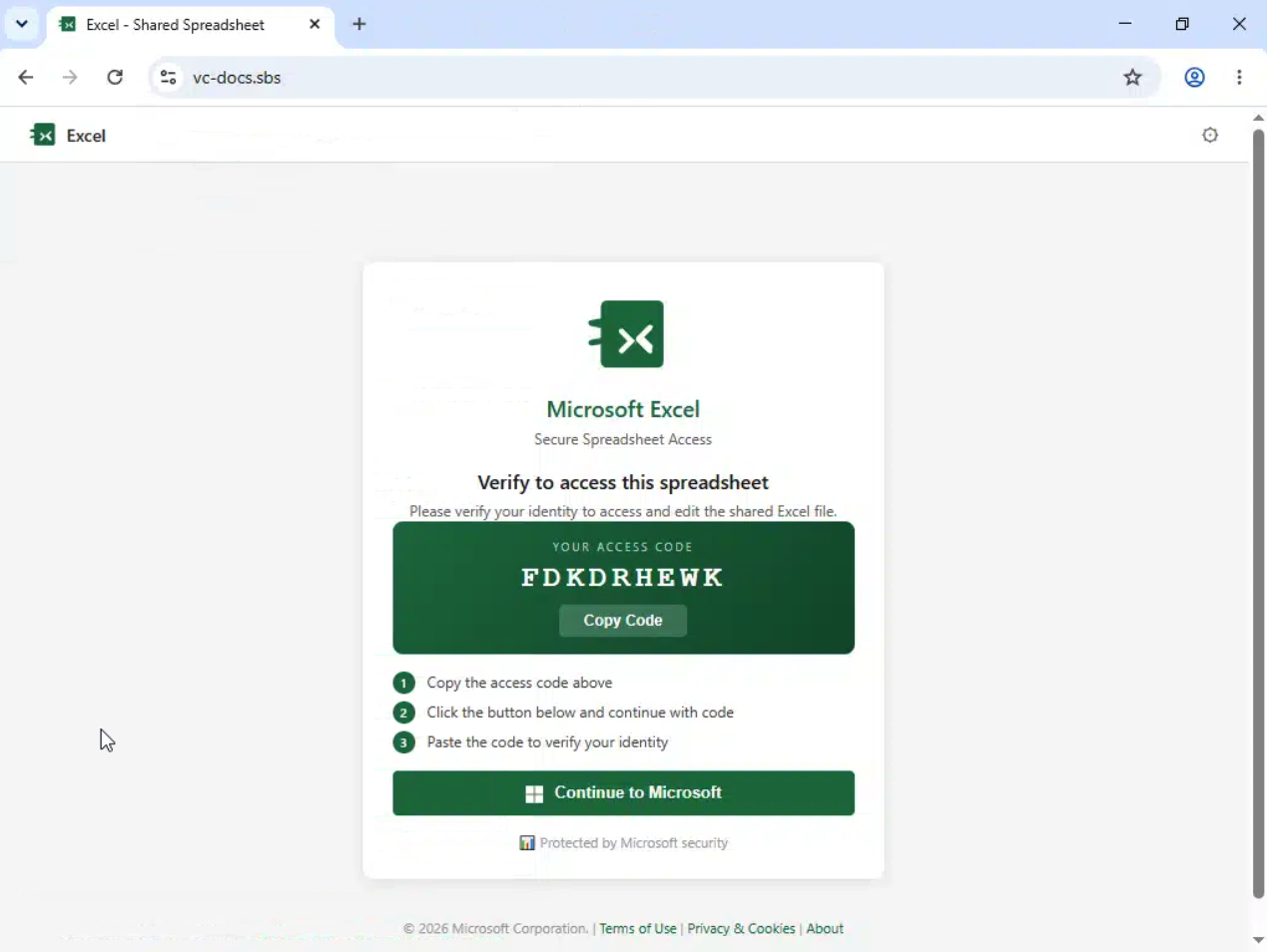 The lure page on
vc-docs[.]sbs, after the Turnstile check.
The page is one HTML file with inline JavaScript. Trimmed, the parts that matter look like this:
1
2
3
4
5
6
7
8
9
10
11
12
13
14
// from the lure page at vc-docs[.]sbs, trimmed
const response = await fetch('/start?_t=' + Date.now(), {
    method: 'POST',
    headers: { 'Content-Type': 'application/json', 'X-Session-ID': sessionId }
});
const data = await response.json();
codeDisplay.textContent = data.userCode;
startPolling(data.deviceCode, data.interval || 5);
...
const response = await fetch(`/state?device_code=${encodeURIComponent(deviceCode)}&session_id=...`);
if (data.status === 'success') { ... showSuccess(); }
...
navigator.clipboard.writeText(code).catch(() => {});
window.open('https://microsoft.com/devicelogin', 'ML', `width=${width},height=${height},...`);
Here is what happens, in order.
When the page loads it sends an empty POST /start. The server answers with a userCode, a deviceCode and an interval of 5. The code is requested when the page loads, and my two visits were given different ones. The nine-character userCode is what the page shows as “Your Access Code”. A timer in the page starts the whole thing again after 14 minutes, logging Code expired, restarting....
The button copies the code to the clipboard and opens microsoft[.]com/devicelogin in a 500 by 600 popup on desktop, or a new tab on mobile. Everything from here on is Microsoft’s own site.
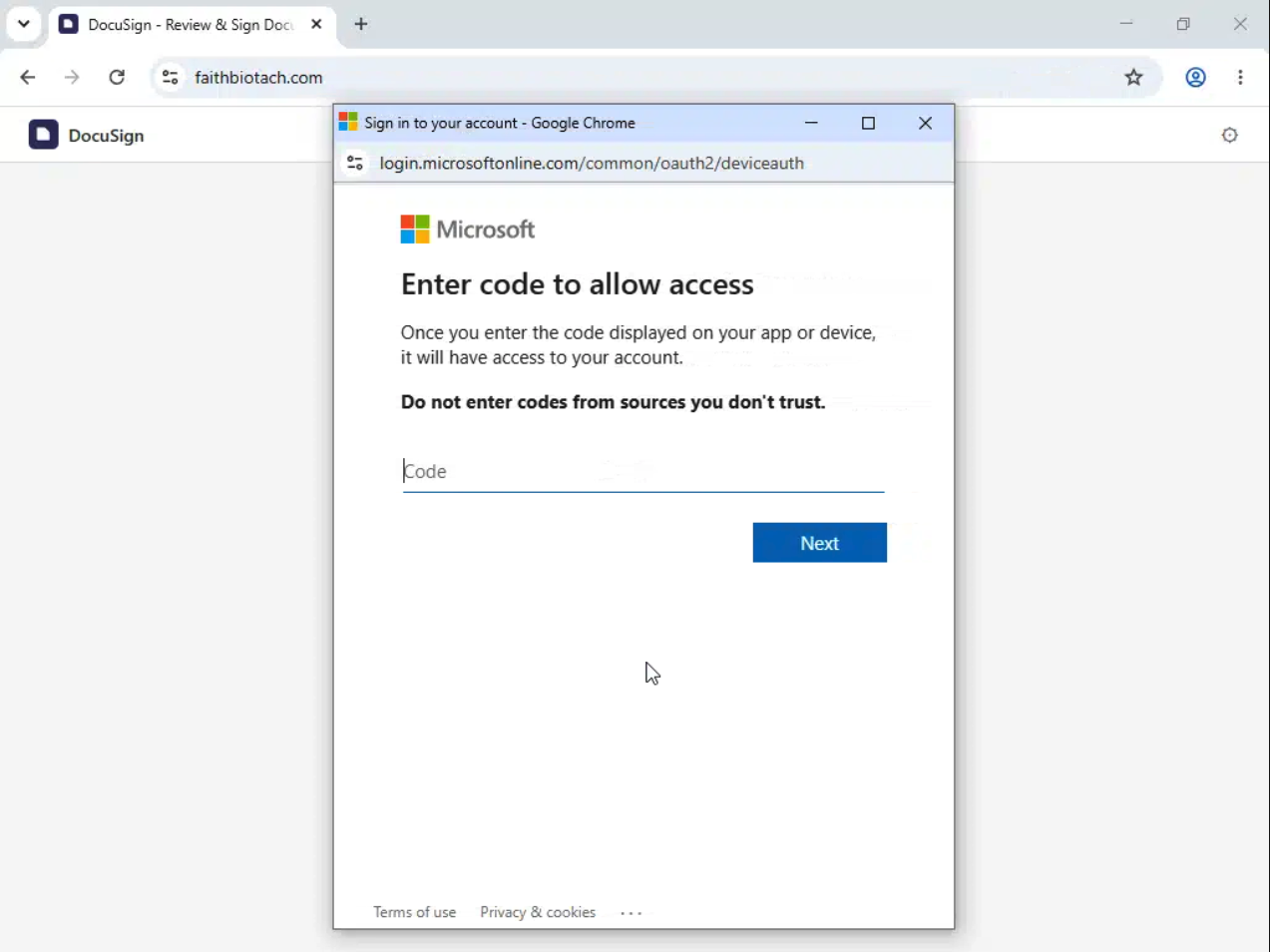 The popup is Microsoft’s real page. This one is over a DocuSign-themed lure on
faithbiotach[.]com, a third mapped domain.
While the victim is in the popup, the lure page calls /state every five seconds with the full device code in the URL. Every answer in my recordings was {"status":"pending"}, as no sign-in was completed. Reading the code, a success answer shows “Verification complete!” for five seconds and then sends the victim to the real excel.office[.]com, so the last thing they see is Microsoft.
That polling is useful for hunting. The device code is in the query string, so if your proxy records full URLs (for HTTPS that means TLS inspection), /state?device_code= should be in its logs for any user who opened one of these pages.
When I typed the code from clearpinkys[.]com into the popup, Microsoft’s page named the application asking for access as Microsoft Authentication Broker, and the response carried the client ID 29d9ed98-a469-4536-ade2-f981bc1d605e. It gave the location of the request as United States. My guess is that the location is where the code was requested from, which would be the kit’s backend and not the victim.
This lines up with the earlier SpiderLabs write-up, which describes the lure copying the code to the clipboard and opening Microsoft’s real device login page in a popup, with the backend polling about every five seconds. It also matches what I could see from the server side: a service called poller_running in the health output, and seven backends in the earlier sweep with auto_action set to device_prt. That is seven of the 27 backends where I captured that field.
One caution on my own data. The settings I harvested the day before listed active_template as microsoft for both domains, and the pages I recorded were both titled Excel - Shared Spreadsheet. The third domain, faithbiotach[.]com, was listed as adobe and showed DocuSign. The operators may have changed templates overnight, microsoft may simply be the name of the Excel-styled page, or that field may not decide what is served. I do not know which, so read the template names in this post as configuration values and not as what a victim was shown.
This is the part that breaks the usual mental model of MFA:
- The victim signs in on Microsoft’s genuine page. The URL is right. The certificate is right.
- The victim completes MFA, and it succeeds, because it is a real sign-in.
- A FIDO2 key or passkey should not help either. Those protect you by checking that the site is the real one, and here it is.
- The tokens go to whoever started the flow. That was not the victim.
MFA was not bypassed. The user did MFA correctly, on behalf of the attacker.
The kit has a second route as well. The console has a section for an “Edge Gateway”, which is covered below, whose capture table has columns for passwords and cookies. That is what a proxy sitting between the victim and the sign-in page would collect. So BlackApex appears to support both styles, and the operator chooses.
From a token to a registered device
A stolen access token is worth about an hour. A refresh token lasts longer but dies when sessions are revoked. BlackApex goes after something better, and the method was published by researcher Dirk-jan Mollema in 2023.
If the device code flow is started as the Microsoft Authentication Broker (a built-in Microsoft application that Windows uses when a machine is being set up), the refresh token that comes back can be used to register a device in the victim’s tenant. The attacker’s server becomes, as far as Entra ID is concerned, one of the user’s computers.
A registered device can ask for a Primary Refresh Token, or PRT. This is the token that gives a Windows machine single sign-on to everything: one long-lived credential tied to a device, which can be exchanged for access to Outlook, SharePoint, Teams and the rest. The PRT also inherits the MFA claim from the original sign-in, so services that ask “did this user do MFA?” are told yes.
That is the application Microsoft named when I entered a kit code, and SpiderLabs reported the same: the Microsoft page the victim lands on says the sign-in is for “Microsoft Authentication Broker”. That is the application the 2023 research depends on, and the console has a table of devices the kit registered and the PRTs it holds for them.
The Windows Hello key: why a reset is not enough
The PRT is strong, but revoking the user’s sessions and removing the device should kill it. So the kit takes one more step.
Windows Hello for Business replaces your password with a key pair. The private key stays on your device and the public key is registered on your account. Signing in with it counts as strong authentication, and it does not involve the password.
If a user completed MFA within the last ten minutes, a registered device can ask for a token carrying a claim called ngcmfa and use it to add a new Windows Hello key to the account. BlackApex has a setting with that name. In the earlier sweep, 15 of the 27 backends where I captured auto_action had it set to winhello, and every one of them also had ngcmfa set to true.
So the attacker now holds a sign-in credential that:
- is not the password, so changing the password does not affect it
- is a valid strong authentication method, so it can request fresh PRTs later
- sits in a list of authentication methods that most responders do not open
In the incident I saw the registered device survive the rotation. The backend behind that sign-in had active_resource set to winhello when I read it on 2026-11-26, so a key like this is a likely reason access persisted. I did not capture that backend’s auto_action, so this is an inference. The credential rotation was done properly. It was aimed at the wrong credential.
The edge gateway
Most node configs carry an edge_gateway_api_key, and for most of the investigation I did not know what it talked to. My Shodan searches did not find it. The console answers the question.
Inside the operator console
I want to address the screenshots upfront. The goal of this section is to document what BlackApex does, and the interface makes the capability set explicit. All images are redacted to protect the people affected. I describe what each page offers, not what was in it. Where I say a button “does” something, I am reading its label. I did not see any of them run.
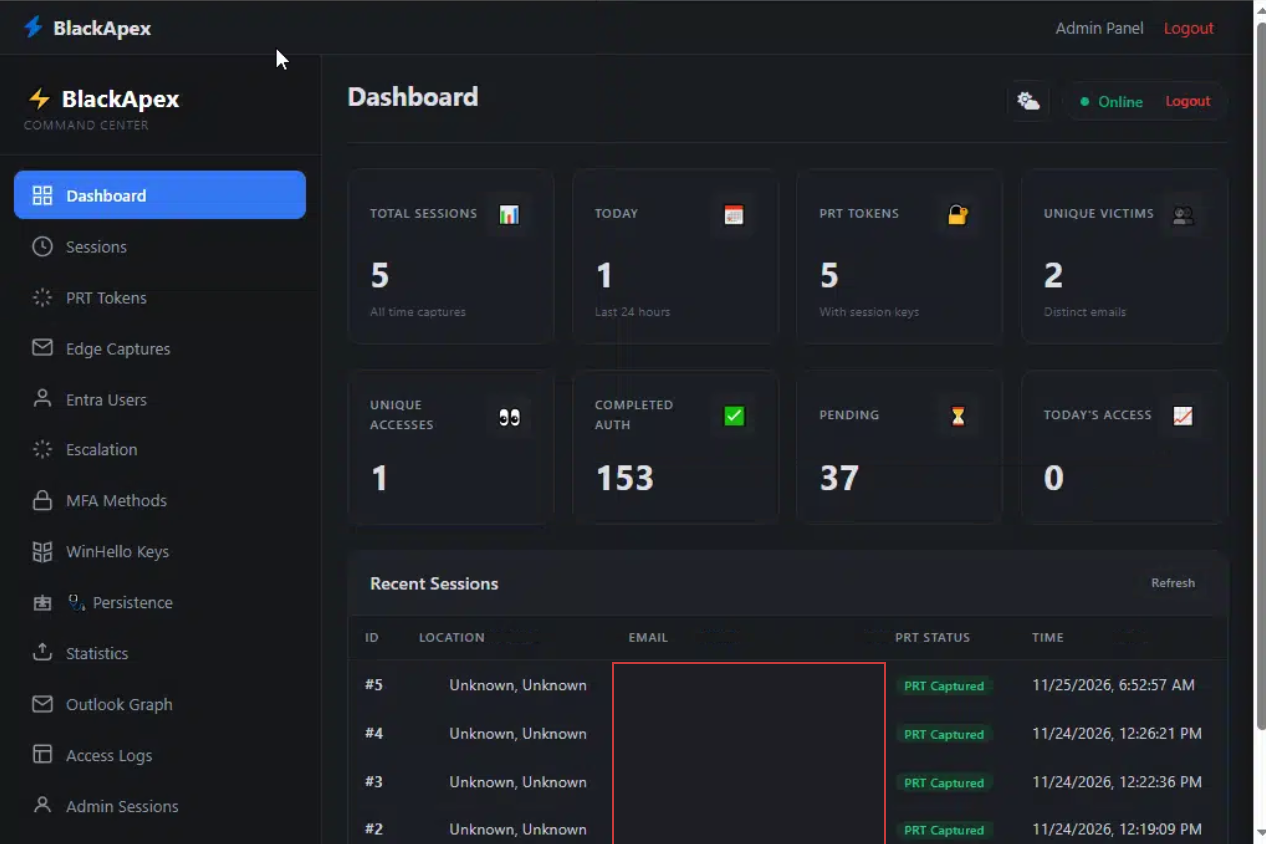
Dashboard
The dashboard. The capture rows are marked “PRT Captured”.
The tile that matters is “PRT Tokens: with session keys”. A PRT is used together with its session key, which is what signs requests made with it. Holding both means the operator can mint new tokens from anywhere.
On the one panel I looked at, PRT and Windows Hello key creation times sit seconds after the session time, which looks automated, not hands-on.
The interface also shows that a repeat sign-in by the same account gets its own device and its own key. That is worth remembering during cleanup: there may be more than one of each.
PRT Tokens
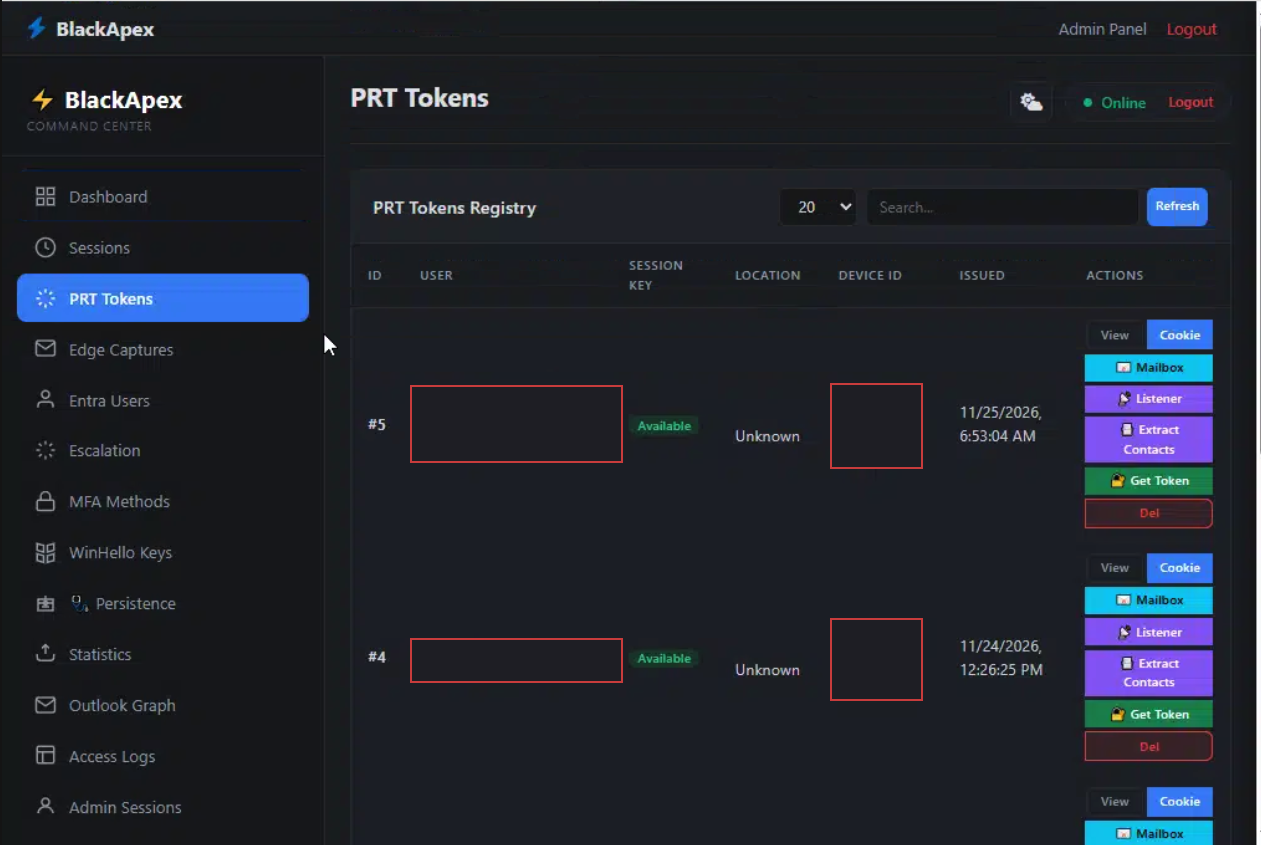 Each captured account gets a row of actions.
| Button | What I believe it does |
|---|---|
| View | Shows the PRT and session key |
| Cookie | Produces a PRT sign-in cookie, so the operator’s browser is signed in as the victim with no password or MFA prompt |
| Mailbox | Opens the victim’s mailbox through Microsoft Graph |
| Listener | Watches the mailbox for new mail |
| Extract Contacts | Pulls the address book, which is the target list for the next round |
| Get Token | Exchanges the PRT for an access token to another service |
Edge Captures
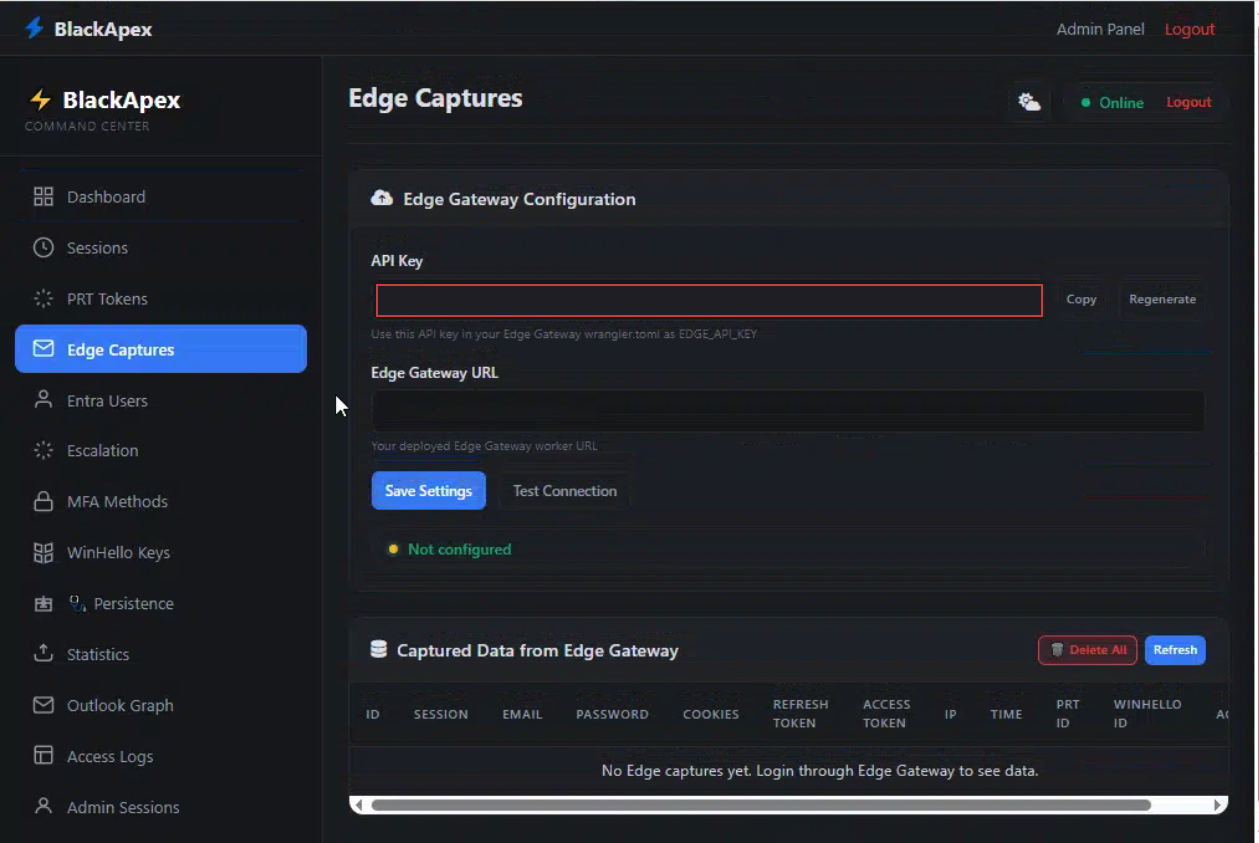 “Use this API key in your Edge Gateway wrangler.toml as EDGE_API_KEY”.
This solved the gateway question. wrangler.toml is the configuration file for Cloudflare Workers, so the “edge gateway” is a Worker the operator deploys themselves. It sits in front of the victim and reports captures back to the panel using that API key. That would explain why it did not show up in my scans: it should not be running on the VPS.
The capture table underneath has columns for Password, Cookies, Refresh Token and Access Token. On this panel the gateway was not configured and the table was empty.
Privilege Escalation
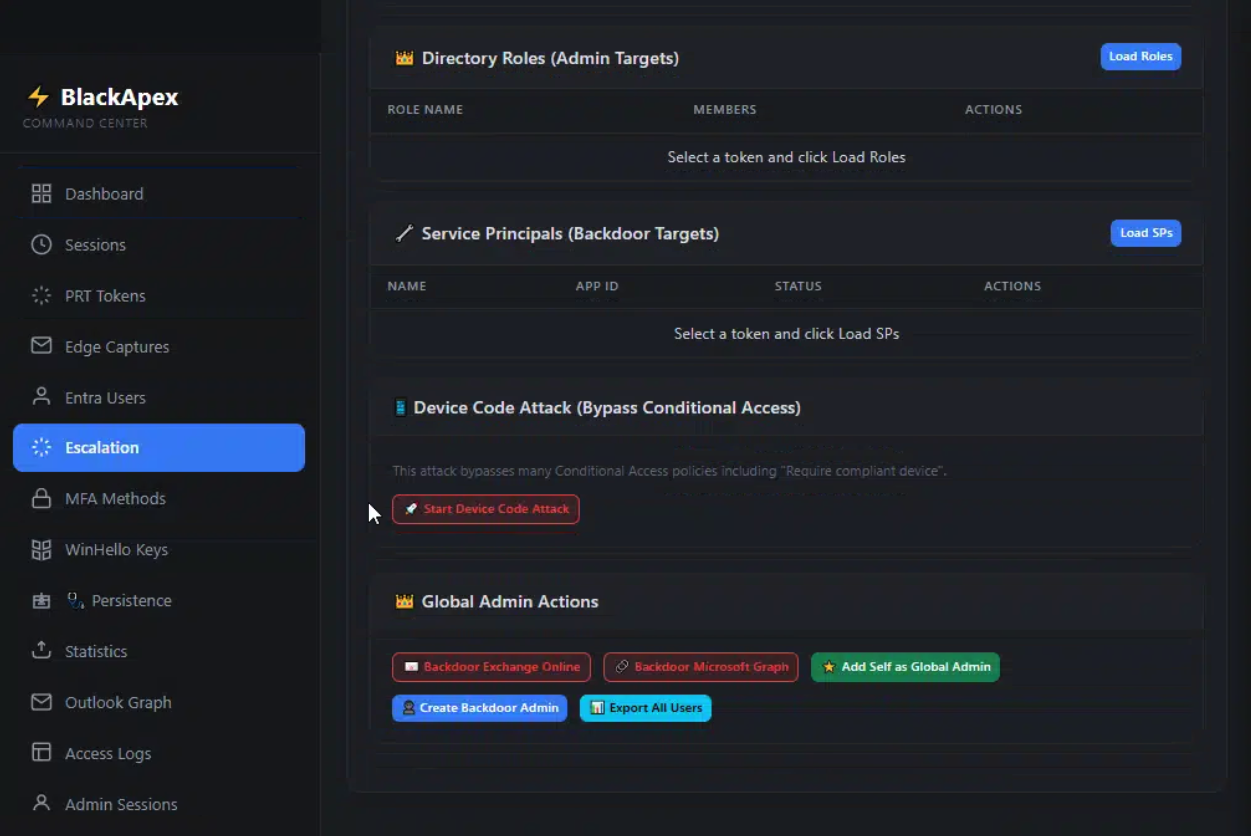 The escalation page. The kit’s own text claims the device code attack “bypasses many Conditional Access policies including ‘Require compliant device’“.
This page is why I stopped thinking of BlackApex as a phishing kit and started thinking of it as a post-compromise console. It offers to:
- check whether the tenant syncs with on-premises Active Directory
- list directory roles, labelled “Admin Targets”
- list service principals, labelled “Backdoor Targets”
- start a second device code attack from inside the session
- with a Global Administrator’s token: “Backdoor Exchange Online”, “Backdoor Microsoft Graph”, “Add Self as Global Admin”, “Create Backdoor Admin” and “Export All Users”
Those last five should only work if the captured account is already highly privileged. The Conditional Access claim is the kit’s marketing copy and I have not tested it. Both points are still useful: they tell you which accounts the operators are hoping to catch, and which controls they believe they can get around.
MFA Methods
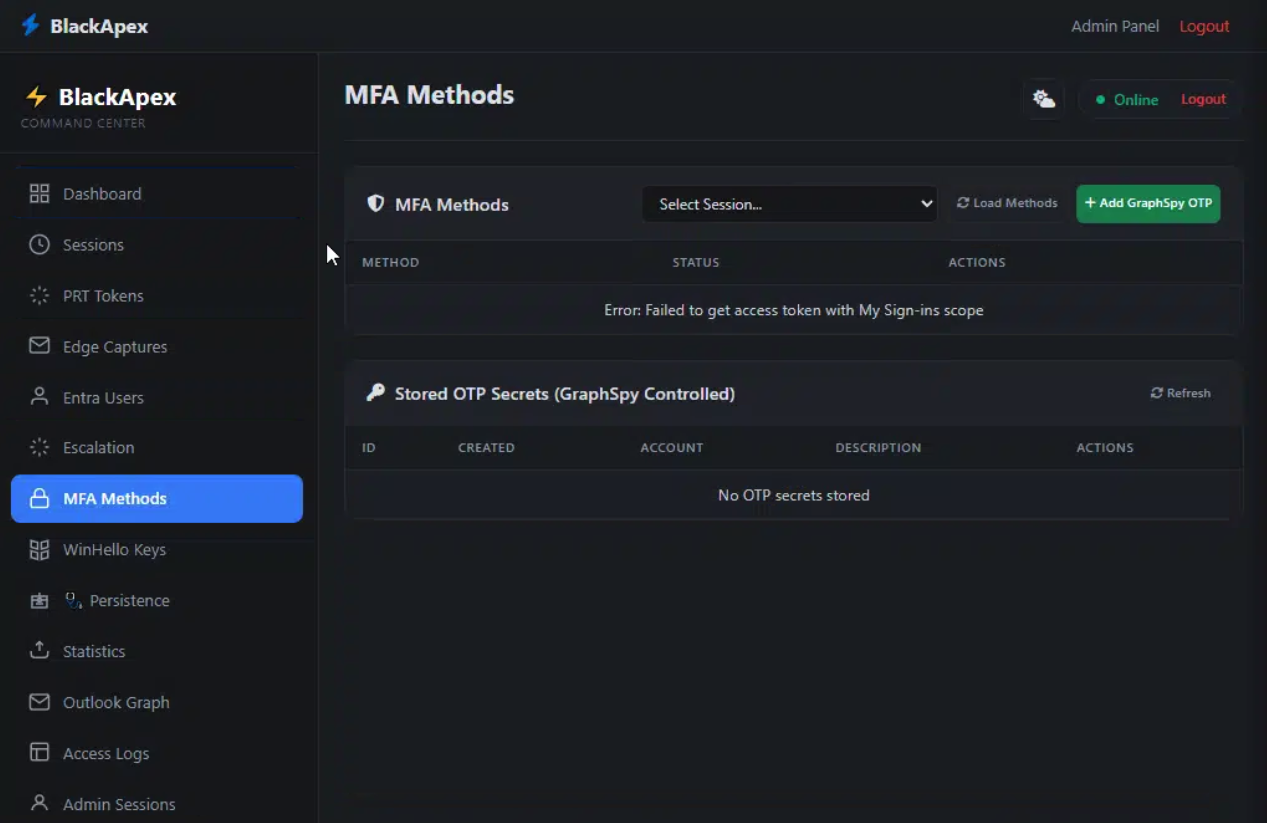 “Add GraphSpy OTP” and “Stored OTP Secrets (GraphSpy Controlled)”.
A second persistence method: add an authenticator app to the victim’s account and keep the seed in the panel, so the operator can generate valid codes whenever they like. GraphSpy is an open-source tool built for penetration testers. The kit names it on the button, so the developer has either reused its code or borrowed its approach.
WinHello Keys and Persistence Health
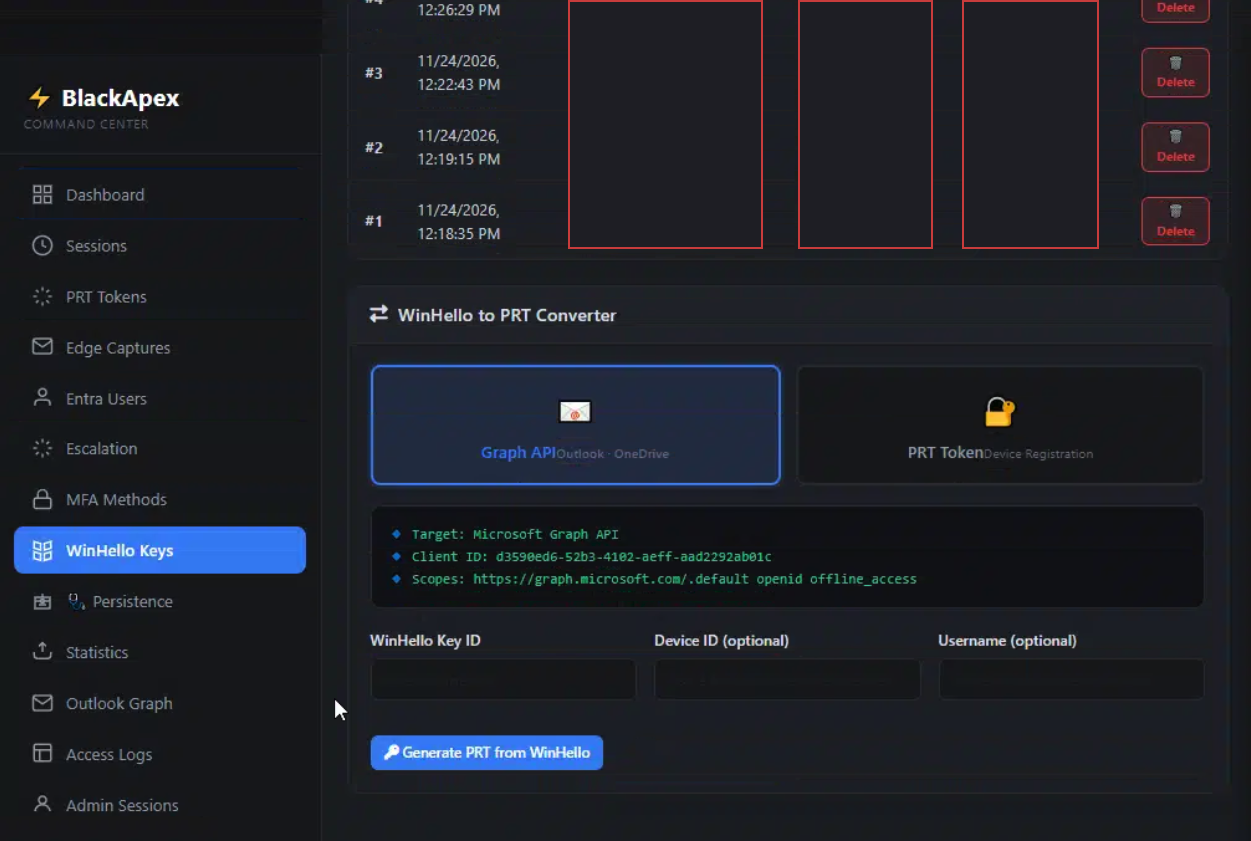 The converter turns a stored Windows Hello key back into fresh tokens.
The “WinHello to PRT Converter” is the payoff for the key registered earlier. Give it a key ID and it produces either a new PRT or a Graph token for mail and files. The Graph option requests tokens as client ID d3590ed6-52b3-4102-aeff-aad2292ab01c, which is Microsoft Office. In your sign-in logs that looks like an ordinary Office client.
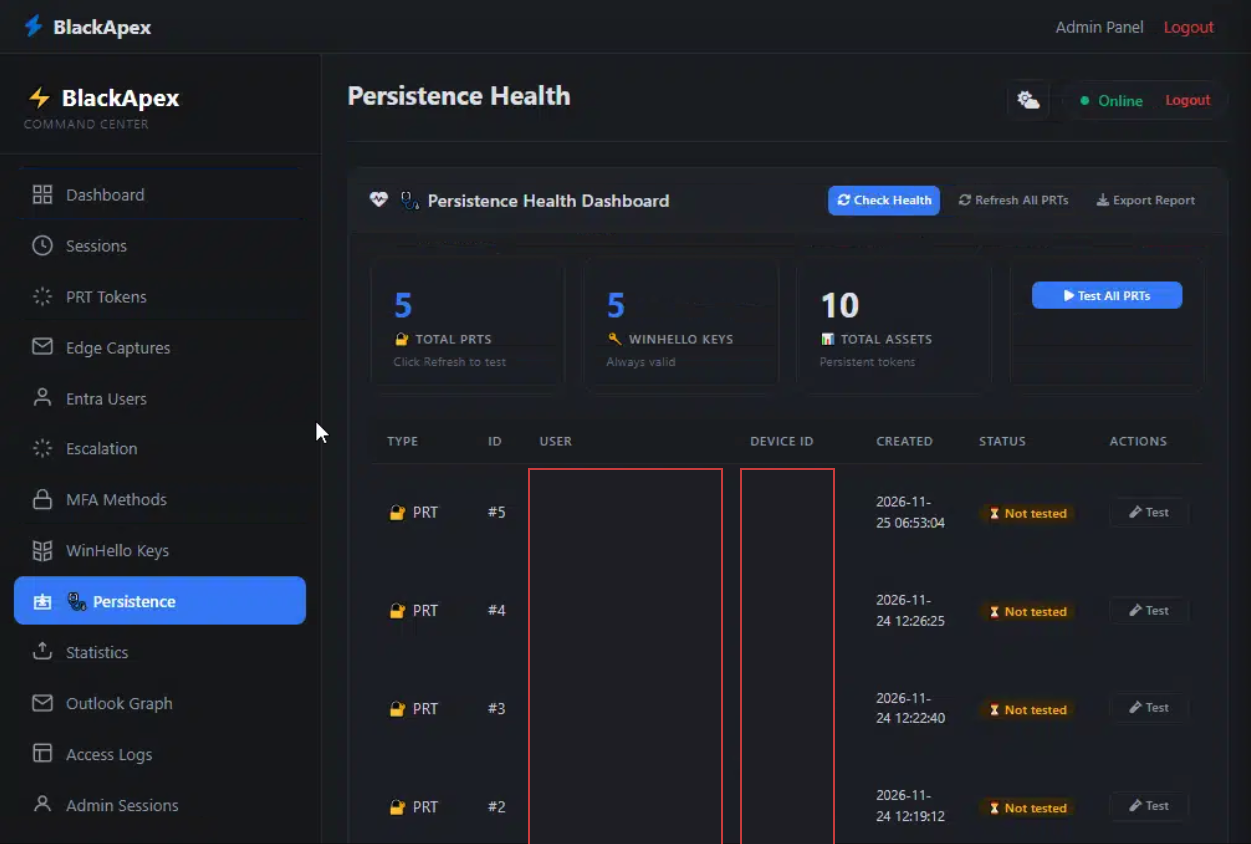 The developer’s own summary of the two credentials.
The developer labels PRTs “Click Refresh to test” and Windows Hello keys “Always valid”. I can’t put the remediation priority more clearly than the person who built the tool did.
Outlook Graph
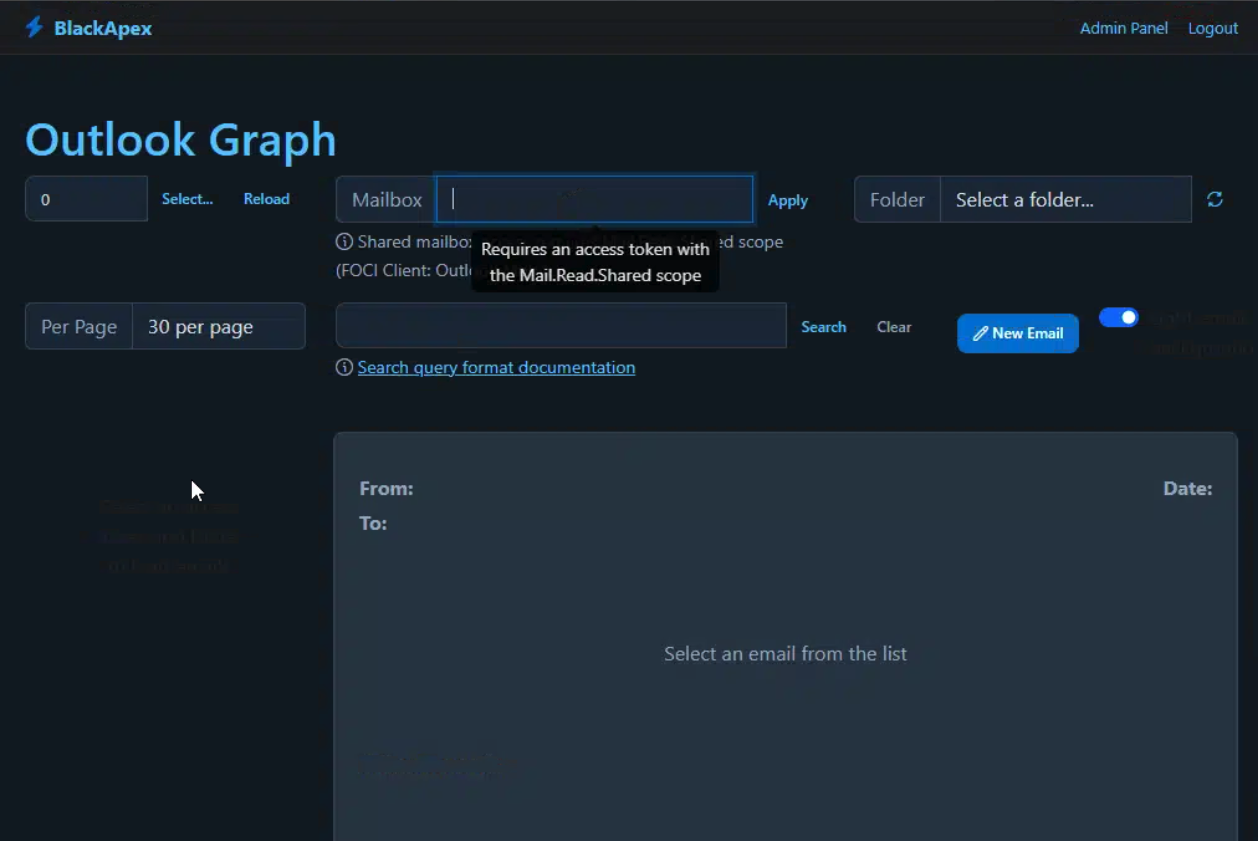 A webmail client built into the panel, with a shared mailbox field and a New Email button.
This is where the money is made. Read mail, search it, send as the victim, and reach shared mailboxes. Invoice fraud and internal phishing both start here.
The panel has a few more pages I have not shown: a directory browser that lists users, groups and roles from any captured account, visitor statistics, and an access log.
The lure library
/api/templates lists the lures installed on each node. The nodes that answered it in the earlier sweep listed 33 template names between them, and a few more names turned up as active templates elsewhere. Most are what you would expect: onedrive, microsoft, teams, sharepoint, outlook, docusign, adobe, voicemail, securedfolder. A few show operators writing their own, with names like QuickBINVMAIN, SAP_remitPay and Microsoft PDF Portal.
Counted per backend in the earlier sweep, the most common active_template values were onedrive (24), microsoft (21), docusign (15) and calendly (10). For what gets stolen, 63 backends were set to prt, 19 to winhello and 12 to graph.
Techniques observed (MITRE ATT&CK)
The following techniques have been mapped to MITRE ATT&CK for future reference. Rows marked “label only” come from button text in the console and were not seen in use.
| Tactic | Technique | ATT&CK ID | What the kit does |
|---|---|---|---|
| Initial Access | Phishing: Spearphishing Link | T1566.002 | Lure link carrying the victim’s address to a gated kit domain (lure delivery per SpiderLabs) |
| Credential Access | Steal Application Access Token | T1528 | Tokens obtained through a Microsoft sign-in the victim completed |
| Persistence | Account Manipulation: Device Registration | T1098.005 | Attacker device registered in the tenant, then a Windows Hello for Business key added |
| Defense Evasion | Use Alternate Authentication Material: Application Access Token | T1550.001 | PRT exchanged for tokens to other services (label only) |
| Collection | Email Collection: Remote Email Collection | T1114.002 | Mailbox access through Microsoft Graph (label only) |
| Discovery | Account Discovery: Cloud Account | T1087.004 | Directory user, group and role listing (label only) |
| Persistence | Modify Authentication Process: Multi-Factor Authentication | T1556.006 | Attacker-held authenticator added to the account (label only) |
| Persistence | Account Manipulation: Additional Cloud Roles | T1098.003 | “Add Self as Global Admin” (label only) |
| Persistence | Account Manipulation: Additional Cloud Credentials | T1098.001 | Service principal and Graph “backdoors” (label only) |
| Lateral Movement | Internal Spearphishing | T1534 | “New Email” as the victim (label only) |
Why this matters
Identity is the attack path now. I saw no exploit and no malware in this chain. An email arrived, a person signed in to Microsoft the way they normally do, and seconds later an attacker could hold a registered device and a sign-in key on that account.
Your users will be targeted with this constantly. There are 570 domains in this one cluster and the kit is used by people who do not need to understand any of the mechanics above. The console turns a published research technique into a row of buttons.
The uncomfortable part for defenders is that the controls we lean on keep working. MFA succeeds, because the sign-in is real. The password reset goes through. Neither of those is where the attacker is standing. The two things that would have mattered are blocking the sign-in flow the kit depends on, and knowing that device and key registrations are part of the cleanup.
What defenders can do
| Technique (ATT&CK) | What to do | Essential Eight | What to hunt for |
|---|---|---|---|
| Phishing link (T1566.002) | Block device code flow with a Conditional Access authentication flows policy | Multi-Factor Authentication, though this technique works after MFA succeeds | Sign-ins where the authentication protocol is device code |
| Token theft (T1528) | Same policy. Limit device code flow to named accounts that need it | No clean E8 home | Device code sign-ins from hosting provider networks |
| Device registration and Windows Hello key (T1098.005) | Restrict who can register devices. Review devices and authentication methods in every account compromise | No clean E8 home | Register device followed within a minute by a Windows Hello credential for the same user |
| PRT and token use (T1550.001) | Require a compliant or hybrid joined device for access to mail and files | No clean E8 home | Microsoft Office client sign-ins from a device registered in the last day |
| Mailbox access (T1114.002) | Keep privileged accounts mailbox-free and off email | No clean E8 home | Graph mail access from a newly registered device |
I’ve kept the Essential Eight column honest. The Multi-Factor Authentication strategy points you at phishing-resistant MFA, and you should do that, but device code phishing is not stopped by it. The sign-in happens on the real Microsoft page, so a FIDO2 key should have no reason to object. This is a Conditional Access problem, and here is what I would do about it in order.
Block device code flow
If I could only make one change, it is this one. Microsoft’s own guidance is to get as close as possible to blocking device code flow everywhere.
In the Entra admin centre, create a Conditional Access policy for all users and all resources, exclude your break-glass accounts, and under Conditions > Authentication Flows select Device code flow. Set the grant control to Block access. Start it in report-only mode.
Before you turn it on, check who actually uses device code flow. Meeting room devices and some command-line tools do. The sign-in logs have an authentication protocol filter for exactly this. Carve out those accounts by name and block everyone else.
Make device registration harder
By default, any user can register a device. Under Entra ID > Devices > Device settings you can limit who may join devices and require MFA for the action. This will not stop the kit on its own, because the victim has just completed MFA, but it shrinks the set of accounts that are useful to capture.
Requiring a compliant or hybrid joined device for access to mail and files goes further. The attacker’s registered device is not managed by your MDM, so it does not pass. The kit claims it can get around this. I have not seen it do so, and the control still means an operator needs a second trick to reach data.
Fix the remediation runbook
This is the one I would take to the team on Monday, because it costs nothing. For any account that was phished:
- Revoke the user’s sessions.
- List the devices registered to the user and delete any they do not recognise. Check the registration time against the incident. Expect more than one.
- Open the user’s authentication methods. Delete any Windows Hello for Business entry, authenticator app or security key that was added in the incident window.
- Check for inbox rules, mail forwarding and new app consents.
- If the account had any admin role, review role assignments and credentials on service principals and app registrations.
- Reset the password.
Steps 2 and 3 are the ones aimed at this kit. Most runbooks I have seen jump from step 1 to step 6. I have not tested this order against a live BlackApex capture. It follows from how the credentials work.
Keep privileged accounts away from the lure
The Global Admin buttons on the escalation page should only work when the captured account is a Global Administrator. Admin accounts with no mailbox, used only from managed devices, never see the email in the first place. The lookup I use does not pair these techniques with an Essential Eight strategy, so this one is my own judgement: it is Restrict Administrative Privileges applied to cloud identities. ASD’s Restricting Administrative Privileges (November 2023) covers the separation.
The other control I would add here is Privileged Identity Management (PIM). It is built into Entra ID, though it is a licensed feature. With PIM an admin is made eligible for a role like Global Administrator and has to activate it when they need it. The role is then active for a set number of hours and drops off again.
I have implemented PIM before and it fits this problem well. If the kit captures an admin who has not activated a role, the tokens it gets are for a standard user. One thing to get right: turn on approval for the high-value roles. One of the activation settings is to require MFA, and Microsoft’s documentation says users might not be prompted if they provided MFA earlier in the session. My read is that a stolen session that already passed MFA could get through that setting. An approval step puts a second person in the way.
Hunting and detection summary
Sign-ins using device code flow, in Microsoft Sentinel or Defender XDR:
SigninLogs
| where TimeGenerated > ago(30d)
| where AuthenticationProtocol == "deviceCode"
| summarize Count = count(), Apps = make_set(AppDisplayName), IPs = make_set(IPAddress)
    by UserPrincipalName
| order by Count desc
A device registration followed quickly by a Windows Hello for Business key:
let window = 2m;
AuditLogs
| where TimeGenerated > ago(30d)
| where OperationName == "Register device"
| extend User = tostring(InitiatedBy.user.userPrincipalName), RegTime = TimeGenerated
| join kind=inner (
    AuditLogs
    | where OperationName has "Windows Hello for Business"
    | extend User = tostring(InitiatedBy.user.userPrincipalName), KeyTime = TimeGenerated
  ) on User
| where KeyTime between (RegTime .. RegTime + window)
| project User, RegTime, KeyTime, CorrelationId
Neither query has been validated in a production tenant. Operation names vary a little between log sources, so run them wide first and tune.
Also worth hunting:
- Proxy: URLs containing
/state?device_code=. The lure page sends the whole device code in the query string every five seconds. - Proxy: requests to
/api/landing-paths/active, especially with/verify-turnstileon the same host. I have not seen a legitimate site expose that pair. - Proxy: URLs containing
check_type=passwordtogether withshareable=trueandaccess=restricted. These come from the gate page code. They were not in my own recordings, where the lure loaded at/. - Web content: the page title
Just a moment... | OneDriveon any host. - Entra audit: more than one device registered to the same user within an hour.
- Entra audit: a new authenticator app or software OATH token added shortly after a device code sign-in.
- Sign-in logs: client ID
d3590ed6-52b3-4102-aeff-aad2292ab01c(Microsoft Office) from a device registered in the last day, from a hosting provider network.
The full IOC list, the Sigma rule and the KQL hunts for this campaign are also available in the companion detection repo.
Indicators of Compromise
This is a sample. The full list of domains and backend addresses is in the detection pack linked above. Lure domains rotate quickly, so treat the behaviours above as the durable detection and the list as a point-in-time block list.
| Type | Indicator | Notes |
|---|---|---|
| IP | 108.186.112[.]17 | Sign-in IP from the incident. BlackApex backend, port 5000 |
| IP | 108.165.15[.]92 | Backend for vc-docs[.]sbs |
| IP | 107.173.53[.]102 | Backend for derrysberry[.]com in the earlier sweep |
| IP | 172.86.74[.]58 | Backend for wannreooshow[.]com |
| Domain | ter-proposal[.]com | Domain configured on the incident backend. Did not resolve on 2026-11-26 |
| Domain | vc-docs[.]sbs | Gate page and lure page analysed in this post |
| Domain | clearpinkys[.]com | Lure page recorded on 2026-11-27 |
| Domain | faithbiotach[.]com | DocuSign-themed lure page seen on 2026-11-27 |
| Domain | derrysberry[.]com | Kit node in the earlier sweep, onedrive template. Did not resolve in the second |
| Domain | valuecoporaatesign[.]info | Kit node in the earlier sweep, onedrive template. Did not resolve in the second |
| Domain | wannreooshow[.]com | Live kit node, microsoft template |
| Domain | citrrusaircraft[.]com | Kit node in the earlier sweep, voicemail template. Did not resolve in the second |
| Domain | cloudmydocs[.]com | Live kit node. Registered 2026-11-22, the newest of the ten domains I have RDAP dates for |
| Page title | Just a moment... | OneDrive | Gate page |
| URL path | /api/landing-paths/active | Kit API, unauthenticated |
| URL path | /verify-turnstile | Gate callback |
| URL path | /start | Lure page asks for a device code (POST, empty body) |
| URL path | /state?device_code= | Lure page polling, every five seconds |
| Page title | Excel - Shared Spreadsheet | Lure page on vc-docs[.]sbs and clearpinkys[.]com |
| URL path | /static/js/anti-bot.js | Referenced by the gate page. Returned 403 to me |
| URL parameters | auth=1&shareable=true&access=restricted&check_type=password | Built by the gate page code for its redirect. Not seen in my recordings |
| Admin page title | Admin Login - BlackApex | Port 5000, sometimes 443. Other titles seen: XXX101-TOKEN, FASA, ALIBOBO-TOKEN |
| Server header | waitress on TCP 5000 | Kit application server |
| Turnstile site key | 0x4AAAAAAFqOWVQ4to01Wh0J | vc-docs[.]sbs |
Detection rules
A Sigma rule for the kit’s URL paths in proxy logs:
1
2
3
4
5
6
7
8
9
10
11
12
13
14
15
16
17
18
19
20
21
22
23
24
25
26
27
28
title: BlackApex Phishing Kit Gate and Lure Requests
id: 6f0d1c1e-2b7a-4d3e-9a51-0c7b6f4e8a21
status: experimental
description: Detects web requests to URL paths used by the BlackApex phishing kit gate and lure pages
references:
    - https://blueteam.cool/posts/blackapex-device-code-phishing-kit/
author: Luke Wilkinson
date: 2026-11-27
tags:
    - attack.initial_access
    - attack.t1566.002
logsource:
    category: proxy
detection:
    selection_path:
        c-uri|contains:
            - '/api/landing-paths/active'
            - '/verify-turnstile'
            - '/state?device_code='
    selection_params:
        c-uri|contains|all:
            - 'check_type=password'
            - 'shareable=true'
            - 'access=restricted'
    condition: selection_path or selection_params
falsepositives:
    - Unknown. /verify-turnstile on its own is a generic name
level: high
Closing
One IP address from one alert was enough to find 97 backend addresses, because the people running them published their own configuration. Attacker infrastructure is worth a second look more often than we give it, and the looking does not need to be sophisticated. A page title did most of the work here.
The thing to take back to your own tenant is smaller than the map. Block device code flow, and put “delete the attacker’s devices and keys” into the runbook above “reset the password”.
Stay curious.
This post documents attacker infrastructure and tooling for defenders. It does not describe or encourage unauthorised access to computer systems.
On methodology: the investigation is mine. The reverse engineering and analysis assembly were carried out with AI workflows (Claude, primarily). I reviewed every finding. Errors are mine - ping me on X or Instagram if you spot something off.
References
- MITRE ATT&CK: T1566.002, T1528, T1098.005, T1550.001, T1114.002, T1087.004, T1556.006, T1098.003, T1098.001, T1534
- Serhii Melnyk, Cris Tomboc and King Orande, BlackApex, SPY, and Counting: The Emerging Wave of Vibe-Coded Phishing Kits (2026-10-30). Earlier public analysis of this kit’s lure pages and device code flow
- Dirk-jan Mollema, Phishing for Primary Refresh Tokens and Windows Hello keys (2023)
- Microsoft Learn, Block authentication flows with Conditional Access policy
- ASD/ACSC, Implementing Multi-Factor Authentication (November 2023)
- ASD/ACSC, Restricting Administrative Privileges (November 2023)